
AI Sales Assistant: The Data Behind Every Task
See what AI sales assistant software does task by task, the data each task reads, and what it invents when a field is empty. Check your stack.


An AI sales assistant is software that reads your sales data, reasons over it, and produces the artefact a rep would otherwise type by hand: an account brief, a priority score, a first-touch email, a call summary, a forecast line. It does not replace the conversation. It replaces the hour that happens before and after it. Every one of those outputs is produced from fields that already sit somewhere in your stack, which is why the same tool feels brilliant on one account and hallucinates on the next.
One distinction settles most of the vocabulary. A sales AI assistant suggests: it drafts, scores and summarises, and a person decides what happens next. An AI sales agent executes: it chains the steps and acts on its own, sending, updating or booking without a check-in on each move. Both read the same records, so both fail the same way when a field is blank.
That is the part the category rarely discusses. Most write-ups describe what an AI sales assistant does. This guide is organised by task, and each task ends on the same question: which data does it read, and what does it produce when that data is missing? An assistant with an empty field does not stay silent. It fills the gap with something plausible, in the same confident register it uses when it is right.
What is an AI sales assistant?
An AI sales assistant is a layer that sits between your sales data and your sales work. It takes an instruction in plain language or a trigger from your CRM, pulls the relevant records, applies a language model or a scoring model, and returns a usable output. The category covers a wide range of shapes: a chat assistant you ask questions, a sidebar inside your CRM, a meeting bot that joins the call, a background job that rescores your pipeline each night.
What unites them is the loop. Every AI sales assistant reads, reasons, then writes. The reasoning step gets the marketing attention because it is the new part. The read step decides the quality of everything downstream, and it is almost never the part anyone audits.
AI sales assistant software, agent, copilot: the words people mix up
An assistant responds to a request and hands the output back to you. An agent chains several steps on its own, calls tools, and acts without checking in on each one. A copilot usually means an assistant embedded inside a product you already pay for. The distinctions matter less than the data question, because all three degrade in exactly the same way when the field they need is blank. Buying guides spend a lot of words on this taxonomy, and the vendor label alone tells you how a tool is packaged, not whether it can reach the field it needs. The split between assistant and agent still deserves a few more lines, because it changes who checks the output before a buyer sees it.
Who stays in control. With an assistant, the human check sits after every output: the rep reads the brief, edits the email, accepts or rejects the score. With an AI sales agent, the check moves to the setup. You write the rules once (which accounts, which message, which conditions stop the run), and from then on the agent acts inside them. A wrong field handed to a rep sometimes gets caught by a human eye. The same wrong field handed to an agent gets sent.
What each one needs to read. An assistant can survive a thin record, because a person fills the gap before anything leaves. An agent cannot: every field it acts on must be present, current and verified, since nothing stands between the record and the buyer. In practice an agent needs the same fields as the table below, plus a stop condition for each one. No verified address, no send. No current title, no personalisation.
When to move from assistant to agent. One task at a time, and only once the assistant's output on that task has stopped needing edits. If reps still rewrite one draft in three, an agent would send those three as they are. The tasks that hand over first are the ones with complete input by construction, such as call summaries. The ones that hand over last read hand-maintained fields, such as forecasting.
Does an AI sales agent replace an SDR? It replaces part of the job: the list building, the first draft, the follow-up timing. It does not replace the judgement on which accounts deserve a human conversation, or the conversation itself. Teams that use agents well tend to keep the SDR and change the work: fewer hours on research and sequencing, more on the calls the agent's preparation made possible.
What an AI sales assistant does, task by task
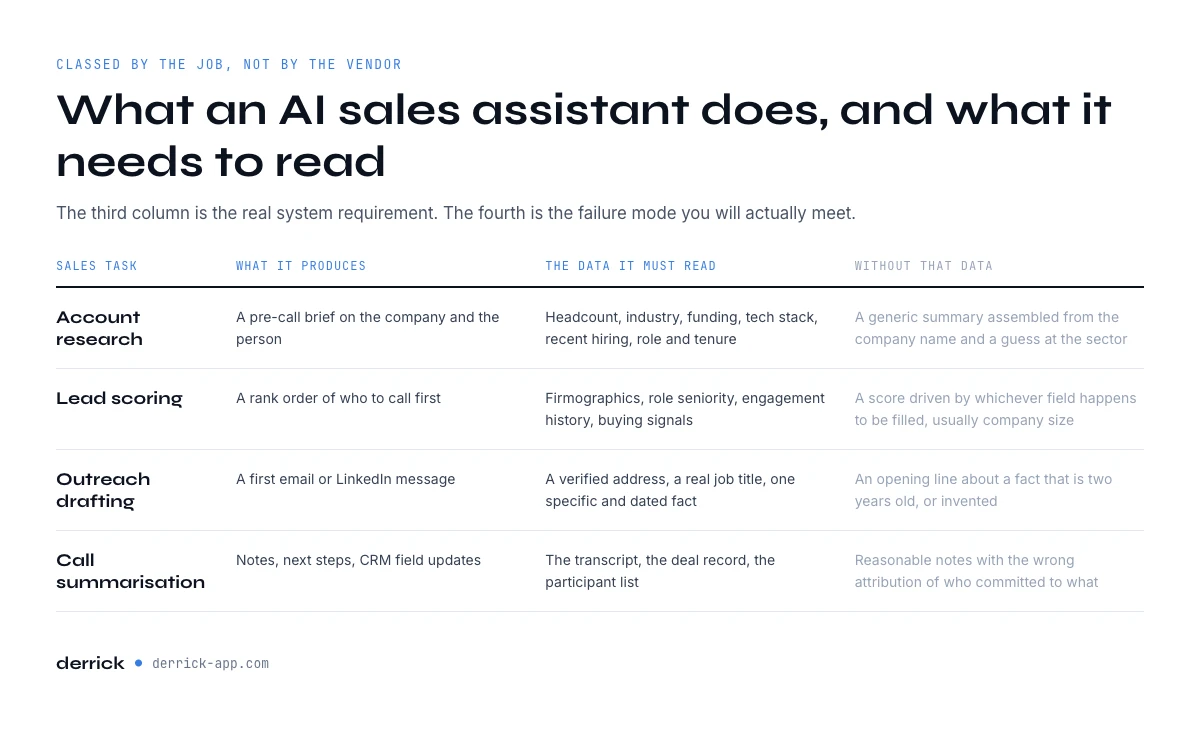
Here is what an AI sales assistant does, in one view, classed by the job rather than by the vendor. Read the third column as the real system requirement, and the fourth as the failure mode you will actually meet. The last column names the kind of AI sales assistant software where each task usually lives, described by function rather than by brand.
| Sales task | What the assistant produces | The data it must read | What it produces when that data is missing | Software category |
|---|---|---|---|---|
| Account research | A pre-call brief on the company and the person | Headcount, industry, funding, tech stack, recent hiring, role and tenure | A generic summary assembled from the company name and a guess at the sector | Enrichment and research tools, or a chat assistant connected to them |
| Lead scoring | A rank order of who to call first | Firmographics, role seniority, engagement history, buying signals | A score driven by whichever field happens to be filled, usually company size | Scoring modules built into the CRM |
| Outreach drafting | A first email or LinkedIn message | A verified address, a real job title, one specific and dated fact | A personalised opening line about a fact that is two years old, or invented | Writing assistants inside your sequencer, or an autonomous agent that also sends |
| Call summarisation | Notes, next steps, CRM field updates | The transcript, the deal record, the participant list | Reasonable notes with the wrong attribution of who committed to what | Conversation intelligence |
| Real-time coaching | Prompts and objection handling during the call | Live transcript, the playbook, the account history | Generic advice, correct in general and useless on this call | Conversation intelligence, in live mode |
| Forecasting | A probability per deal and a number for the quarter | Stage history, activity volume, close dates, past win rates | A confident number built on stale stages that nobody updated | Forecasting built into the CRM, or a revenue platform |
Notice the pattern in the fourth column. Not one of those failure modes looks like a failure. There is no error message, no blank field, no flag. That is the specific risk of putting an AI sales assistant on top of a CRM nobody has audited in a year. An empty field does not stop the assistant. It changes what the assistant is doing, silently, from reading to guessing.
The six sections that follow take these tasks one by one, in the same order: account research, lead scoring, outreach drafting, call summarisation, real-time coaching and forecasting. It is the only classification this guide uses.
Account research before the call
Research is the task where an AI sales assistant shows the clearest return. A rep preparing five meetings spends most of that prep opening tabs: the company site, a LinkedIn page, a funding database, a news search. An assistant does the same reading in seconds and returns a structured brief: what the company sells, how many people work there, who the person is, what changed recently.
The quality of that brief is entirely a function of what the assistant can reach. If the AI sales assistant can only read your CRM record, it can only tell you what your CRM already knew, phrased more nicely. The useful version reaches outside: headcount as of now rather than as of the import, the current job title rather than the one captured at first contact, whether the company is hiring for roles that imply your problem.
The data this task reads: company identity and size, industry, technologies in use, hiring activity, the person's current role and tenure. What it invents when that data is absent: a plausible sector description and a seniority guess inferred from the job title string, which is exactly the kind of output that reads well and briefs badly.
On the Derrick side, the fields that matter here come from Enrich Leads at 1 credit per profile and Company Hiring Signal at 1 credit per company, both available on the free plan. Enrich Leads reads LinkedIn, so it needs your LinkedIn account connected through the Derrick Chrome extension. Hiring is the cheapest recency signal there is: it dates itself, which is the property most enrichment fields lack.
Scoring the pipeline: what predictive scoring actually reads
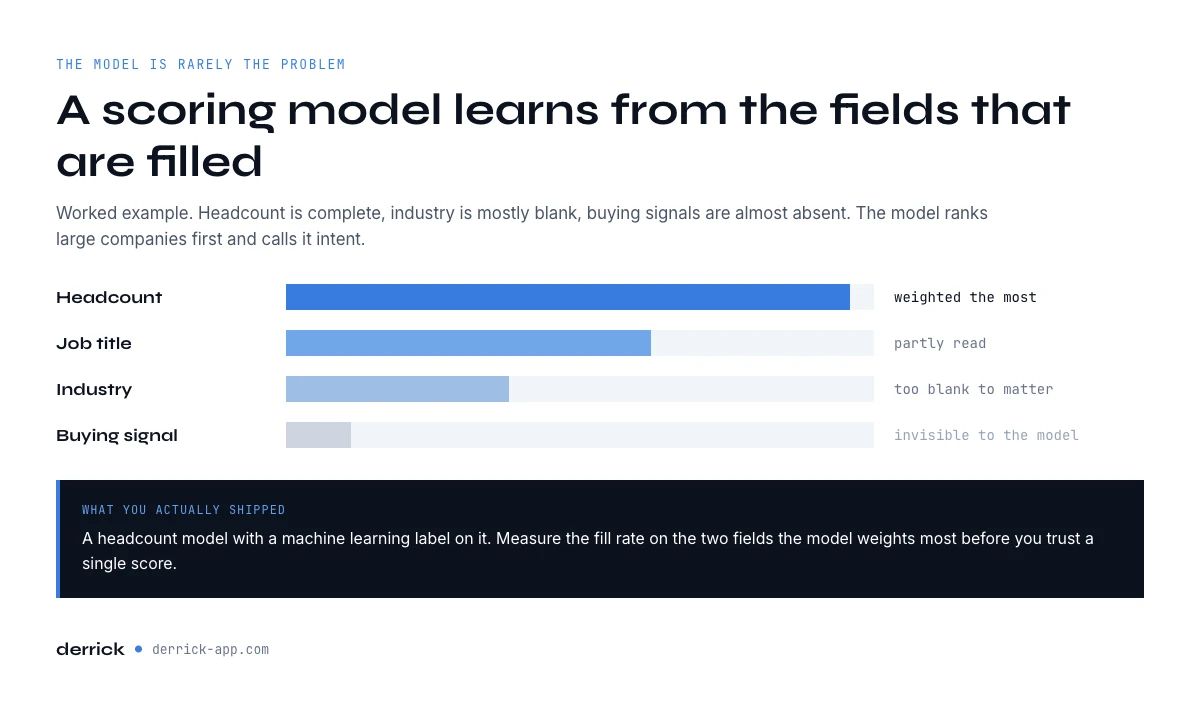
Predictive lead scoring is the oldest promise in this category and the one most often broken by its inputs. It is also the task where an AI sales assistant is trusted the most and inspected the least. The model is rarely the problem. A gradient boosting model trained on your closed-won history is a solved engineering problem. The problem is that the model learns from the fields that are filled, and in most CRMs the fields that are filled are the ones the form required, not the ones that predict revenue.
The practical consequence: if industry is 40 percent blank and headcount is complete, your scoring model becomes a headcount model with a machine learning label on it. It will rank large companies first and call it intent. Independent industry studies put 30 to 40 percent of B2B records short of essential fields such as job title or company size. Our own CRM data quality report sets the target that matters at above 80 percent completion on the fields that drive revenue, and our AI-ready data report covers why the model is almost never the thing that broke.
The data this task reads: firmographics with high fill rates, role seniority normalised rather than free text, engagement events with dates, and at least one signal the buyer emits rather than one you inferred. What it invents when that data is absent: a confident ordering of your pipeline that reproduces your existing bias, which is worse than no score, because a number invites you to stop thinking.
The fix is not a better model. It is filling the two or three fields your model actually weights, on the records that matter, before you score. That is a small, bounded enrichment job, not a data programme. Run it on the current quarter's accounts rather than the whole database and it takes an afternoon, which is usually the difference between a fix that happens and one that stays on a roadmap.
Drafting outreach, and the field that makes it land
Every AI sales assistant writes a decent email. That stopped being a differentiator some time ago. What separates a reply from a delete is not the prose, it is the one specific, dated, verifiable fact the message is built on, and that fact is a data field, not a writing skill.
Ask an AI sales assistant to personalise from an empty record and you get the house style of the entire category: a compliment about the company's growth, a reference to their "focus on innovation", an opening line that could be sent to nine thousand companies. Ask it to personalise from a record that carries a hiring signal, a technology in use, and a correct current title, and the first sentence writes itself and is true.
The data this task reads: a verified email address, a current job title, and one dated fact about the account. What it invents when that data is absent: a personalisation that is grammatically specific and factually generic, plus, if the address was never verified, a well written message delivered to a bounce.
Summarising the call: conversation intelligence and its input
Conversation intelligence is the most reliable AI sales assistant task on this list, for a simple reason: the assistant is handed a transcript, so the input exists and is complete by construction. Summarisation, action item extraction, sentiment, talk ratio, and objection tagging all work on text the tool captured itself.
The failure moves one step downstream, to the write-back. The summary is accurate; the CRM update built from it is only as good as the record it lands in. If the deal has two contacts and one of them is a stale record with an old title, the assistant attributes the commitment to the wrong person and writes that attribution into the field a manager reads next week.
The data this task reads: the transcript, the participant list, and the deal record it writes back to. What it invents when that data is absent: nothing in the summary itself, which is why this one earns trust, and then a mis-attributed next step in the CRM, which is where the trust gets spent.
Coaching in real time, on what the assistant can hear
Live coaching is the AI sales assistant task that runs while you are busy. It surfaces a battlecard, an objection response, or a nudge about talk ratio while the call is running. It works because the input is the live transcript and the playbook you wrote, both of which are under your control.
Where it gets thin is account context. A prompt that says "mention the security review" is useful only if the assistant knows this account has a security review, and that knowledge lives in the CRM, not in the audio. Coaching quality therefore tracks CRM freshness, with a delay: the coaching feels generic long before anyone traces it back to a record nobody updated.
The data this task reads: the live transcript, your playbook, and the account history. What it invents when that data is absent: advice that is correct in general and inapplicable here, which reps learn to ignore within two weeks.
Forecasting: the most data-hungry task of all
Forecasting is where an AI sales assistant is asked to produce the highest-stakes number from the lowest-quality input. The model reads stage history, activity volume, close dates and your past win rates, then returns a probability per deal and a total for the quarter.
Every one of those inputs is maintained by hand, by people whose incentive is not to maintain it. This is the one task where the honest recommendation is to fix the input before buying the tool: an AI sales assistant cannot repair a pipeline hygiene problem, it can only render it in higher resolution. Stages move late, close dates get pushed in batches at the end of the month, and activity is logged unevenly. The model does not know it is reading a fiction. It produces a number with a confidence interval, and the confidence interval is calculated on the fiction.
The data this task reads: stage transitions with timestamps, logged activity, close dates, historical outcomes. What it invents when that data is absent: precision. This is the most dangerous output in the category, because it is the one senior people act on without inspecting the inputs.
What an AI sales assistant cannot do
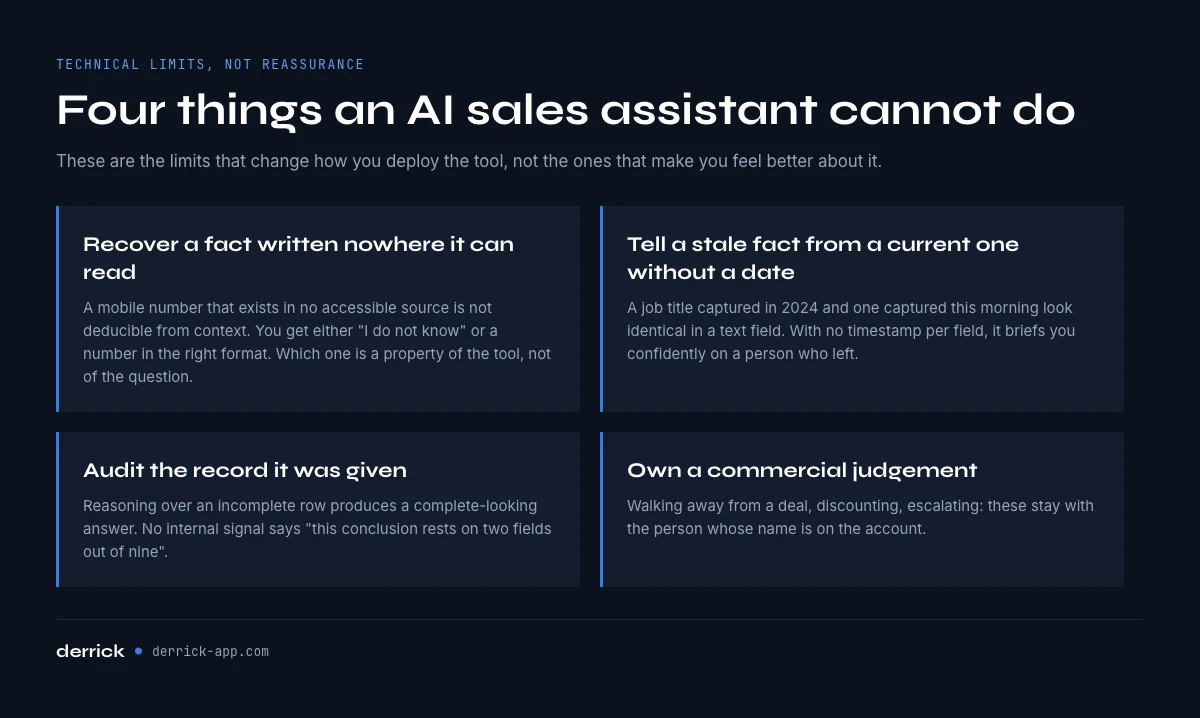
The usual reassurance is that an AI sales assistant will not replace salespeople. True, and not very useful. Here are the limits that are technical, not comforting, because these are the ones that change how you deploy the tool.
It cannot recover a fact that is not written anywhere it can read. A mobile number that exists in no accessible source is not deducible from context. The assistant will either say it does not know, or produce a number in the right format. Which of the two you get is a property of the tool, not of the question.
It cannot tell a stale fact from a current one without a date. A job title captured in 2024 and a job title captured this morning look identical in a text field. Unless your records carry a timestamp per field, the assistant treats both as equally true, and confidently briefs you on a person who left.
It cannot audit the record it was given. An AI sales assistant reasoning over an incomplete row produces a complete-looking answer. There is no internal signal that says "this conclusion rests on two fields out of nine".
It cannot own a commercial judgement. Deciding to walk away from a deal, to discount, or to escalate involves information that never enters the system: what a buyer said in a corridor, how a champion sounded. That is the real boundary, and it is much narrower than the reassurance implies.
Where your AI sales assistant should live
Most of the category asks you to adopt a new platform and call it your AI sales assistant. There is a cheaper path, and it is the one most teams already half-built without noticing: the assistant your reps use every day is Claude or ChatGPT, and what it lacks is not intelligence, it is access to live company and contact data.
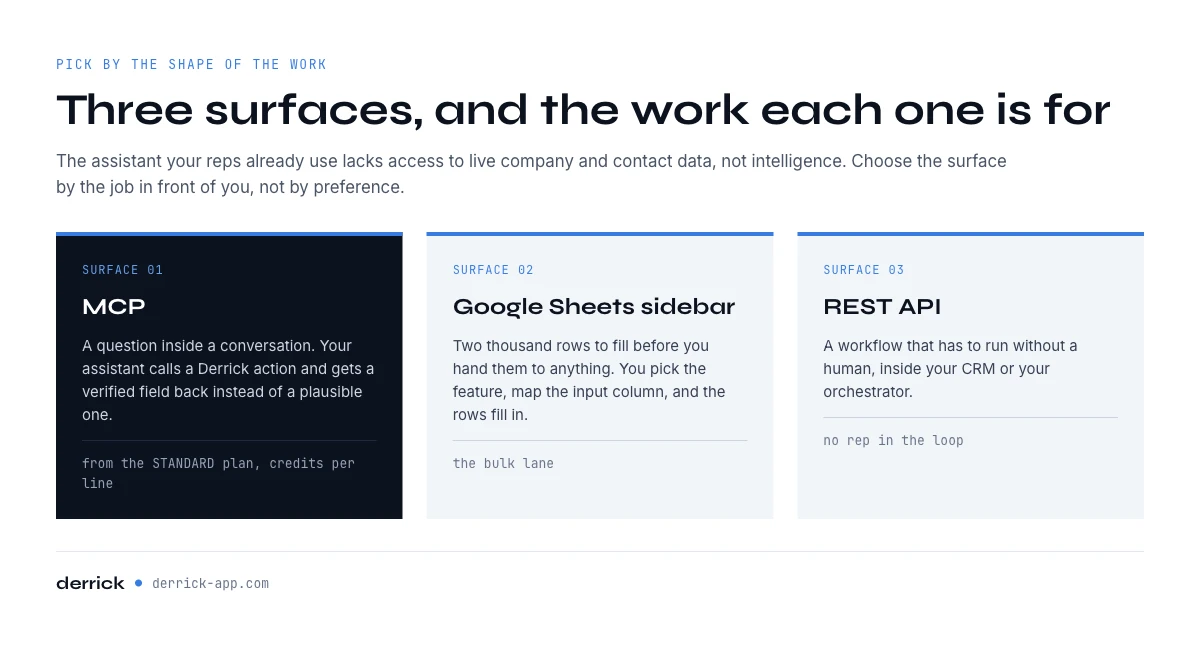
That gap is what the Model Context Protocol closes. Derrick MCP exposes Derrick's enrichment actions to any MCP-compatible client, so a rep can ask a question in the chat and get a verified field back instead of a plausible one. It is available from the PLUS plan, so neither the free plan nor the entry paid plans open it, and the actions it calls consume credits per line processed, exactly as they do in the web app or the sidebar. Our sister guide on enriching B2B data from an AI agent covers the setup step by step.
Pick the surface your AI sales assistant runs on by the shape of the work, not by preference. A question inside a conversation goes to MCP. A list of two thousand rows to fill before you hand it to anything goes to the Derrick web app, or to the Google Sheets sidebar if the list already lives there. A workflow that has to run without a human, inside your CRM or your orchestration tool, goes to the REST API. The same data and the same credit model sit behind every surface, so the choice is one of ergonomics, not of strategy.
For the spreadsheet path specifically, Ask Claude runs a model over a column at 2 credits per line, from the paid plans, and our guides on Claude in Google Sheets and OpenAI in Google Sheets cover the prompt patterns that survive contact with a thousand rows.
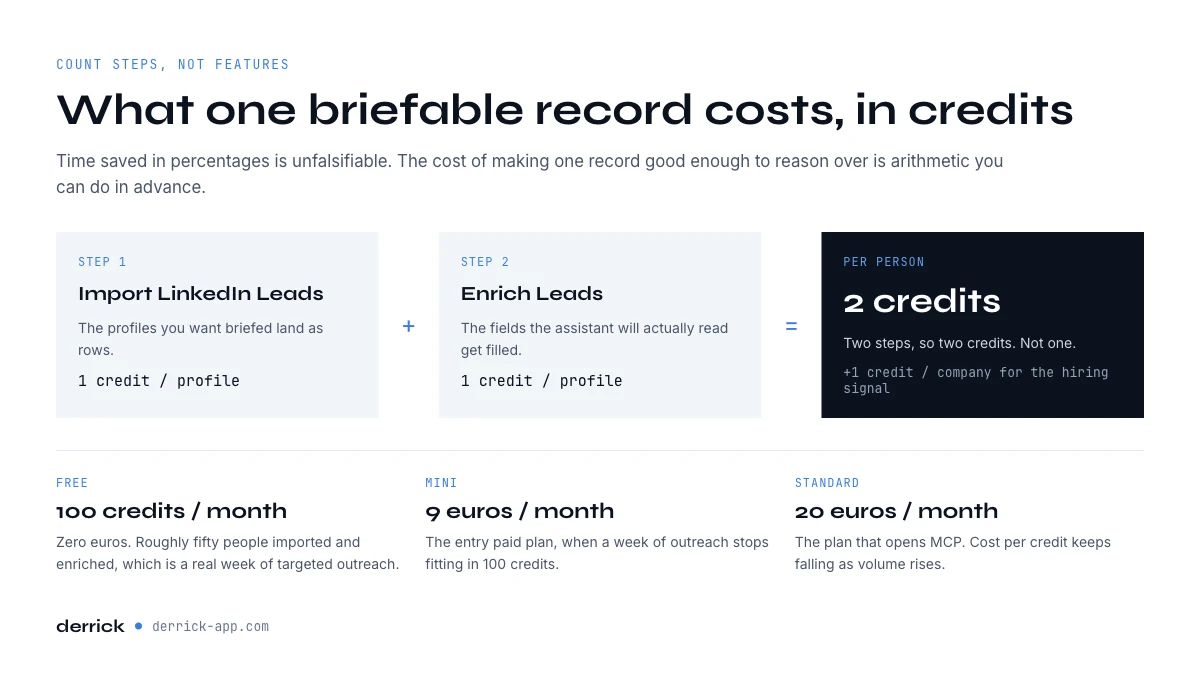
What an AI sales assistant costs per line
Vendors describe AI sales assistant value in percentages of time saved. Those numbers are unfalsifiable. The arithmetic that is checkable is the cost of making one record good enough for the assistant to reason over, so here it is, counting steps rather than features.
Take a list of LinkedIn profiles you want briefed. Importing them with Import LinkedIn Leads costs 1 credit per profile. Filling the fields with Enrich Leads costs 1 credit per profile. That is two steps, so two credits per person, not one. Adding the hiring signal at company level costs 1 more credit per company, and companies are fewer than people, so that line is cheaper than it looks.
On the free plan, 100 credits a month at zero euros covers roughly fifty people imported and enriched, which is a real week of targeted outreach rather than a demo. Paid plans start at 20 euros a month on STANDARD, with the cost per credit falling as volume rises. The point of the arithmetic is not the total. It is that you can compute it in advance, which is not true of a seat-based AI sales assistant licence.
One caveat worth stating plainly, because it is the most common budgeting error in this category: count the steps, not the tools. A chain that imports then enriches costs two credits per row even though both operations feel like one action, and a plan that includes a paid-only feature cannot be exercised with free-plan credits at all.
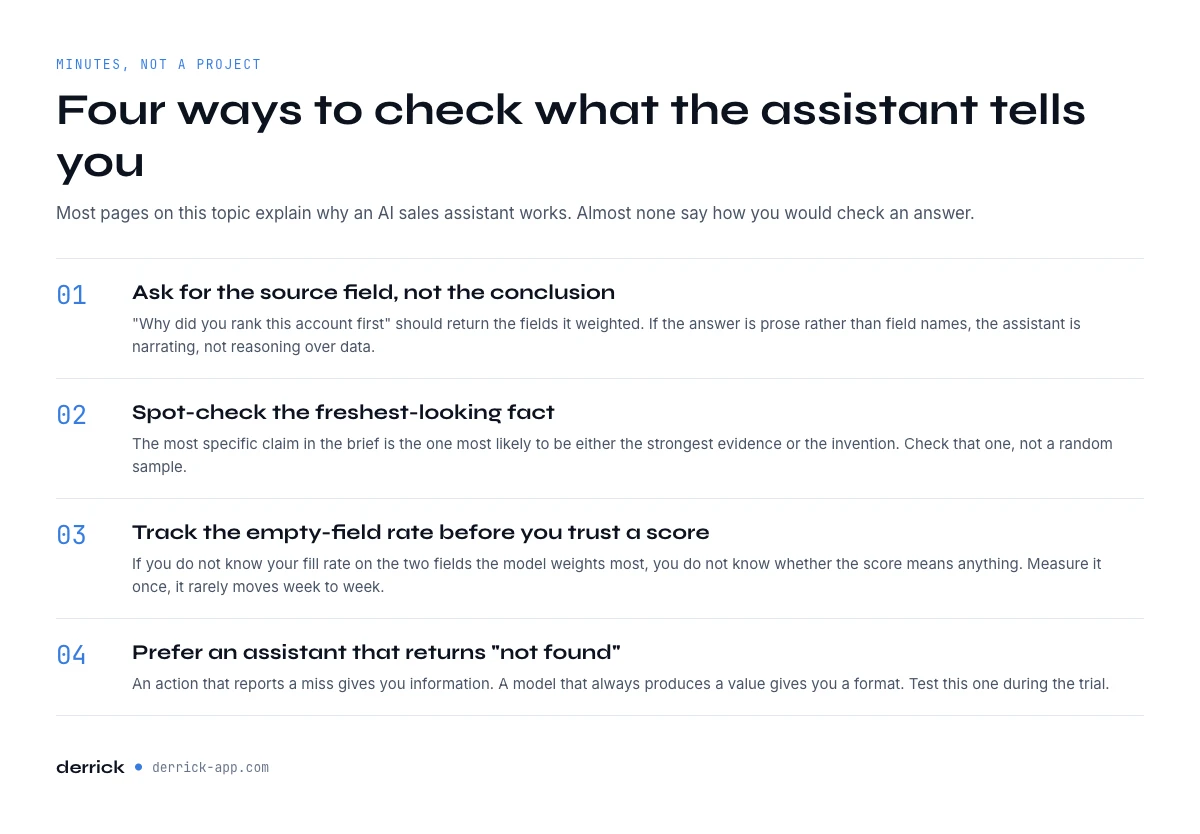
How to verify what the assistant tells you
Nearly half the pages ranking on this topic in September 2026 cite natural language processing and machine learning as an argument for why an AI sales assistant works. None of them say how you would check an answer. Here is a workable routine, and it takes minutes rather than a project.
Ask for the source field, not the conclusion. "Why did you rank this account first" should return the fields it weighted. If the answer is prose rather than field names, the assistant is narrating, not reasoning over data.
Spot-check the freshest-looking fact. The most specific claim in the brief is the one most likely to be either the strongest evidence or the invention. Check that one, not a random sample.
Track the empty-field rate before you trust a score. If you do not know your fill rate on the two fields the model weights most, you do not know whether the score means anything. Measure it once; it rarely moves week to week.
Prefer an AI sales assistant that returns "not found". An enrichment action that reports a miss gives you information. A model that always produces a value gives you a format. This is the single most useful property to test during an evaluation, and it takes ten records to test.
What can your AI sales assistant actually read?
Select every field you can resolve today on a cold account. The verdict is about which assistant tasks will hold and which will produce invention, not a score out of ten.
Select the fields you can actually resolve today.
Multi-select: click a field again to remove it. The verdict splits identity (who this is, and can you reach them) from context (why now), because an assistant can be solid on one and inventing on the other.
How to choose an AI sales assistant: a short checklist
Most buying guides for the best AI sales assistant software compare feature lists. Six questions sort the options faster, and three of them already have a section on this page.
- Where should it live? In a chat, on a list or inside a headless workflow: see where your AI sales assistant should live.
- What does it cost per line? Count steps, not seats: see the cost per line, step by step.
- Can you check its answers? Ask for source fields: see how to verify the assistant's output.
- Which data does it read? Ask the vendor for the list of fields each task consumes, and where each field comes from: your CRM, a live source, or the model's memory. A tool that cannot name its inputs cannot tell you when they are missing. The free tool above gives you your side of that answer.
- What happens before anything is sent? Check whether a person approves each output, or whether the tool can send, update or book on its own. If it can act, ask what stops it on a record with no verified address.
- How will you measure the gain? Pick one number before the trial starts, on one task, and write down today's value. Without that baseline, the best AI sales assistant software and the worst one produce the same anecdote.
Sales AI assistant benefits you can measure
The benefits of a sales AI assistant that survive a quarter are the ones you can count on your own data, not the percentages on a vendor page. Three are worth tracking from day one.
- Prep time per meeting. Time a rep's research before five calls without the assistant, then with it. The difference is the hour the tool was supposed to give back.
- Conversations per rep per day. Time saved on research only counts if it turns into more calls or more replies. If the number of conversations does not move, the hour went somewhere else.
- Edit rate on outputs. Count how many drafts, briefs or summaries a rep rewrites before using them. A falling edit rate is the clearest sign the assistant is reading real fields rather than guessing.
None of these needs a dashboard. A shared sheet with three columns and two weeks of notes is enough to tell a tool that works from one that only demos well.
Rolling it out: one task, one measure, then the next
Deploy the assistant the way you would test any process change: narrow first. Pick the one task from the table above where your input is already complete, usually call summaries or account research, and run it with a small group for two weeks. Fill the two or three fields that task reads before the trial, not during it, so the result measures the tool rather than your data gaps. Then read the three numbers above. If they move, extend to the next task in the table. If they do not, check the fill rate before blaming the model. Teams that switch on every task at once learn nothing, because when the output is wrong nobody can say which input caused it.
The conclusion of this guide is deliberately unglamorous. Choosing an AI sales assistant is mostly a data readiness decision wearing a software evaluation costume. The reasoning layer has become a commodity and it is genuinely good. The gap between a team that gets value from it and a team that quietly stops opening it is the fill rate on four or five fields, and that gap is closeable in an afternoon.
Frequently asked questions
What is an AI sales assistant?
What tasks can an AI sales assistant automate?
Does an AI sales assistant replace salespeople?
Why does an AI sales assistant give wrong answers on some accounts?
Does an AI sales assistant integrate with my CRM and my stack?
How much does it cost to make data good enough for an AI sales assistant?
How do I verify what an AI sales assistant tells me?
Keep reading
Continue exploring this cluster


Ask Claude in Google Sheets: Enrichment Workflow (2026)
Read →

Ask OpenAI in Google Sheets: AI-Powered Outreach (2026)
Read →

Enrich B2B Data From an AI Agent: The Derrick MCP Workflow
Read →

The AI-Ready Data Report 2026: Why AI Fails on Data, Not the Model
Read →