
LinkedIn profile finder: find anyone's profile by name and company
Yes, you can find a LinkedIn profile from a name and a company, as long as the profile is public. There are three ways: search LinkedIn while signed in, run an X-ray search on Google without an account (site:linkedin.com/in plus the name and the company), or use a LinkedIn profile lookup tool that turns a name and a company into a profile URL, one row or a whole list at a time.

Find LinkedIn profile data from what you already have
Why this cluster matters
What you'll learn
Resolving one identity is not the same job as building a list, and most teams conflate the two. A name alone returns every homonym; a name plus a company returns one person. Getting that distinction right is what separates a clean list from one quietly filled with the wrong people.
For who · SDRs, BDRs, Recruiters, Growth Engineers, RevOps
- What a LinkedIn profile URL is, and why the vanity slug is the stable part
- Finding a profile from a name and a company, and why the company is what makes it reliable
- Finding a profile from a work email, and why generic mailboxes never resolve
- Which fields a public profile carries: headline, job title, tenure, skills, languages, region
- Why a lookup that always returns a result is guessing, not being thorough
- Running the same lookup on a list instead of one row at a time
How to find a LinkedIn profile by name and company
There are three ways to find a LinkedIn profile from a name and a company, and they differ less in accuracy than in what they need from you: a LinkedIn account, a Google search, or a column in a spreadsheet. The table below sums them up; each method is detailed right after.
| Method | What you give | What you get | Account needed | Cost |
|---|---|---|---|---|
| LinkedIn search (People filter) | A name, then the current company filter | Matching profiles, one search at a time | A LinkedIn account | Free, with a monthly search limit on free accounts |
| X-ray search on Google | site:linkedin.com/in + name + company | Public profiles that Google has indexed | None | Free |
| Sales Navigator | Name, company, title, region filters | Profiles with advanced filters and saved lists | A paid LinkedIn subscription | Subscription |
| Derrick Search Leads | First name, last name, company (one row or a whole column) | The profile URL for each row, or an empty cell when there is no confident match | LinkedIn connected through the Derrick Chrome extension | 1 credit per profile, paid plans (from Mini) |
| Derrick Enrich Leads | A profile URL | Job title, company, location, headline and the other public fields | LinkedIn connected through the Derrick Chrome extension | 1 credit per profile, free plan included |
1. LinkedIn's own search, signed in
Type the name in the search bar, switch to the People results, then add the Current company filter. Location and industry narrow it further. It is the most direct way to find someone on LinkedIn, and the right one for a handful of people. It stops in three places: you need to be signed in, a free account has a monthly limit on searches beyond your network, and every search is one person at a time.
2. X-ray search on Google, without an account
Google indexes a large share of public LinkedIn profiles, so you can search them without logging in. Copy this query into Google and replace the name and company:
site:linkedin.com/in "Jane Doe" "Acme"
The quotes force the exact name and the exact company. If nothing comes back, drop the quotes around the company, or add the job title instead (site:linkedin.com/in "Jane Doe" "head of sales"). Two limits: only profiles that the person allows search engines to show appear, and Google returns what it indexed, which can lag behind a recent job change.
3. A LinkedIn profile lookup tool: name and company in, URL out
The third way is to hand the name and the company to a lookup tool that returns the profile URL. It is what you use when the list is longer than a few rows, because the same search runs identically on every line and you get one column of URLs back. In Derrick this is Search Leads: 1 credit per profile, on paid plans. A word on vocabulary: some tools call "profile lookup" the statistics of a profile you already know. Here, a LinkedIn profile lookup means finding the person's profile URL.
From a work email
LinkedIn no longer lets you search members by email address, so an email works as a way to get back to the name and the company. The local part, before the @, usually encodes the name (first.last, flast, first), and the domain identifies the employer. It fails on shared mailboxes: contact@ or sales@ belong to nobody. This path has its own page: find a LinkedIn profile URL from an email.
From a company page
When you need the people rather than one person, start from the company: list its staff, filtered by function if needed, and you get profiles. This is a different job from the ones above. You are not resolving a known identity, you are building a list, and the question changes from "is this the right person" to "is this the right set of people".
Is it OK to look someone up on LinkedIn by name and company?
Yes, when the profile is public. A public LinkedIn profile is information the person chose to publish so that others can find them, often for exactly the kind of professional contact a lookup prepares. Finding it from a name and a company is legitimate, whether you look up one person before a meeting or a list of B2B contacts before a campaign.
The line is between public and private. Every method on this page, including ours, reads only what the person made public. None of them opens a profile restricted to connections, and none should try: getting around someone's privacy settings, or pretending to be someone else to see a hidden profile, is where looking someone up stops being acceptable. Data protection law also applies to how you then store and use what you found, as it does for any contact data.
Will the person know I looked them up?
It depends on the method. When you open a profile while signed in to LinkedIn, the member may see your visit in "Who viewed your profile", unless you browse in private mode (Settings, then Visibility, then profile viewing options). A Google X-ray search does not notify anyone: you see a search result, not a profile visit. A lookup that only resolves a name and a company to a URL does not send the person a message or an invitation.
Telling homonyms apart
A name alone is rarely enough. Common first-and-last-name combinations return dozens or hundreds of profiles, and picking the wrong one silently corrupts a list. Three criteria settle it, in this order:
- The current company. It is a structured field on the profile, so it is the strongest filter. If you have it, always give it.
- The job title. It separates two people with the same name at the same large company.
- The location. Useful for global companies with the same title in several countries.
On a list, fill the company column on every row before you run the lookup. A row with only a name is a candidate to confirm, not a fact to store. And when nothing matches with confidence, an empty cell is the right answer: it is a row you can check, instead of a plausible wrong profile.
What a LinkedIn profile URL actually is
A profile URL looks like linkedin.com/in/some-slug. The slug is the stable identifier of a person on the platform: titles change, companies get left, the slug usually stays. That is why the URL, not the name, is the key to store in your CRM. Its format and how to check one are covered in how to find a LinkedIn profile URL.
What you can read once you have the URL
A public profile carries a predictable set of fields, and each of them is its own lookup: full name, headline, current job title, previous job titles, tenure at the current company, skills, languages, education dates, region, follower count, and whether the account is a Premium one. Below this article you will find one page per starting point for each of these: which value you have, which value you get.
Two of these deserve a note. The headline is free text the person wrote themselves, so it is the best single field for personalisation and the worst for filtering: it is not normalised, and half of it is slogans. The job title is closer to structured, which makes it the one to filter on, but it still carries whatever internal vocabulary the company uses. A "Growth Lead" and a "Head of Growth" may be the same job or two levels apart depending on the org.
What no method can do
No tool reads a profile that is not public, and none invents an address that never existed. No method on this page returns an email address or a phone number either: those live outside the profile, and finding them is the next step, with an email finder or a phone finder. If what you are after is the address rather than the person, the email finder guide covers that path.
The behaviour to demand from any lookup is an explicit "no match". A result on every row means the tool is guessing on the rows where it should have abstained, and you cannot tell which ones those are. Every silent error is a person receiving a message meant for somebody else, which is a reputation problem long before it is a data problem.
Finding LinkedIn profile URLs on a whole list
Finding one profile is a manual search and takes a minute. Finding two hundred is a different problem, and the difference is not volume: it is repeatability. You need the same lookup applied identically to every row, a cost you know before you start, and a clear answer on the rows that fail.
In the Derrick web app, nothing to install: import your list of names and companies, run Search Leads, and the profile URLs fill in, one per row. Then run Enrich Leads on the URLs to read the job title, company and location. If your list already lives in a spreadsheet, the same lookup runs in Google Sheets from the Derrick sidebar. To look up one person in the middle of a conversation, ask Claude or any MCP client through the Derrick MCP server. To wire it into your own pipeline or CRM, call the REST API (API documentation). On every surface, LinkedIn features need your LinkedIn account connected through the Derrick Chrome extension; the API and the MCP server are included from the Plus plan.
What it costs, and how to keep it predictable
Count the steps, not the features. Resolving a name and a company to a URL (Search Leads) costs 1 credit per profile, and reading the profile (Enrich Leads) costs 1 more. A list of 100 people is therefore 100 × (1 + 1) = 200 credits. Search Leads is available on paid plans, from Standard (€20 a month, 10,000 credits). The free plan, 100 credits a month without a credit card, covers Enrich Leads on profile URLs you already have.
The practical way to keep the bill predictable is to resolve first and enrich second. Run the resolution pass on the whole list, look at how many rows came back empty, then only enrich the rows that resolved. Enriching a list you have not resolved spends credits on rows that were never going to produce anything.
Five mistakes that cost the most
Trusting a name-only match. It is the single biggest source of silent corruption in B2B lists. If the name is all you have, treat the output as a candidate to confirm, not as a fact to store.
Ignoring homonyms on a big company. Two people with the same name at the same company are more common than you think at 50,000 employees. Add the job title or the location before you trust the match.
Re-resolving a list you already resolved. The profile URL is stable. Once you have it, later enrichments should start from it, not from the name again: it is cheaper and it removes the ambiguity entirely.
Filtering on the headline. It reads like a job title and is not one. Filter on the job title field, personalise with the headline.
Reading an empty cell as a tool failure. Sometimes it is. Often it is a person who left the company on your file, a generic mailbox, or a profile that is not public. The distribution of your empty rows tells you which: and it is usually the input, not the lookup.
Every way to find LinkedIn profile data
Pick the value you already have on the left, and the one you need on the right.
LinkedIn profile finder
Start enriching your list in 30 seconds
Free for 100 credits/month. No credit card.
Install the add-on and enrich your lists without leaving your spreadsheet.
Install in Google Sheets →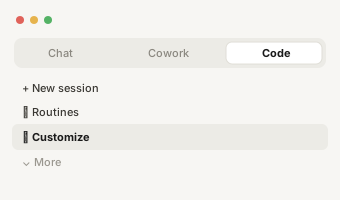
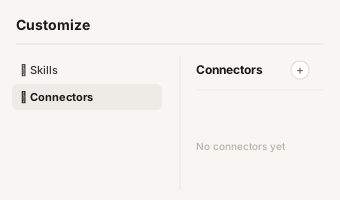
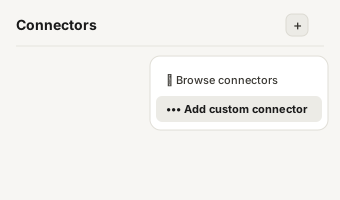
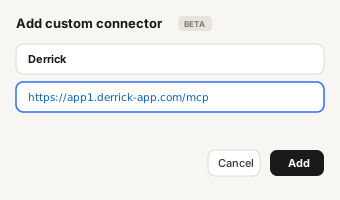
https://app1.derrick-app.com/mcp Call the same enrichment endpoints straight from your own stack or workflow.
Read the API docs →Frequently asked questions
Can I find a LinkedIn profile from just a full name?
Yes, but the match is only reliable when you add the company. A name on its own returns every homonym, and picking the wrong one silently corrupts your list. If all you have is the name, treat the result as a candidate to confirm, not as a fact.
Can I find a LinkedIn profile from an email address?
Usually yes, when the email is a personal work address: the local part carries the name and the domain identifies the employer. It does not work on shared mailboxes like contact@ or sales@, since no single person is behind them.
What data can I get from a profile once I have the URL?
The public fields: full name, headline, current and previous job titles, tenure, skills, languages, education dates, region, follower count. Each of these has its own page in the list below, one per starting point.
How fresh is the data behind a profile?
Every lookup runs live at the moment you ask, against the public profile as it stands today. Nothing is served from a stored snapshot, so a job change from last week shows up as last week's job change.
Why do some rows come back empty?
Three usual causes: the person left the company you have on file, the input was a generic mailbox, or the profile is not public. An empty cell is an honest answer: it is what lets you fix the input instead of mailing the wrong person.
How much does one lookup cost?
Finding a profile URL from a name and a company costs 1 credit per profile, on paid plans from Mini. Reading the profile once you have the URL costs 1 credit per profile, and that step is included in the free plan (100 credits a month, no credit card).
Can you find a LinkedIn profile without an account?
Yes, with an X-ray search on Google: type site:linkedin.com/in followed by the name and the company in quotes. You only see public profiles that Google has indexed, but you do not need to sign in to LinkedIn.
Will the person know I looked them up on LinkedIn?
If you open their profile while signed in, they may see your visit in "Who viewed your profile", unless you browse in private mode. A Google X-ray search or a lookup that only resolves a name to a URL does not notify them.
How many searches can I run on a free LinkedIn account?
LinkedIn applies a monthly commercial use limit to people searches beyond your network on free accounts, and does not publish a fixed number. When you reach it, results are capped until the next month; a paid LinkedIn plan, an X-ray search or a lookup tool gets around the bottleneck.