
Cold Email Templates That Work in 2026, and the Data Behind Them
Cold email template guide: 12 B2B formats, the variables each needs, where that data comes from, and why verified addresses decide your reply rate.


A cold email template is a reusable skeleton: a fixed structure with named gaps you fill from what you know about the person. The structure is the easy half. The gaps are where campaigns are won or lost, because a template with nothing real in its variables reads exactly like every other template that landed in that inbox this morning.
Most template collections hand you a hundred formats and stop there. This one gives you twelve that cover almost every B2B situation, for sales teams writing to accounts they have never spoken to, and for each one it names the exact fields you need before you can send it, where those fields come from, and what happens to your numbers when a field is missing. The order of operations for the whole channel sits in the cold email pillar guide: technical trust first, list quality second, copy third. Templates are the third layer. They cannot rescue the first two. If the channel itself is new to you, start with the cold email definition in our glossary.
Need a first draft fast? The free cold email generator writes three variants from one real signal on the account, with a subject line and a single ask, and never invents a fact. Use this page to choose the right template for each account and to know which data it needs. The subject line deserves its own work too, and the cold email subject lines guide covers it.
What a cold email template can and cannot do
A template does three useful things. It stops you rewriting the same structure forty times a week. It keeps your reasoning visible, so a reply rate becomes attributable to a format rather than to a mood. And it makes testing possible, because you cannot A/B two emails that share no structure.
A template does not create relevance. It does not make you credible to someone who has never heard of you. And it very definitely does not fix an address that no longer exists. That last point gets skipped constantly. A campaign that bounces at 12 percent is not a copy problem, and rewriting the opening line will not move it. Fix the list, then judge the copy.
The practical test is simple. Take your template, strip out every variable, and read what is left. If the remaining sentences would make sense sent to any company in your market, the template is doing no work. Every good format below fails that test on purpose: without its variables it is unreadable, because the variables are the message.
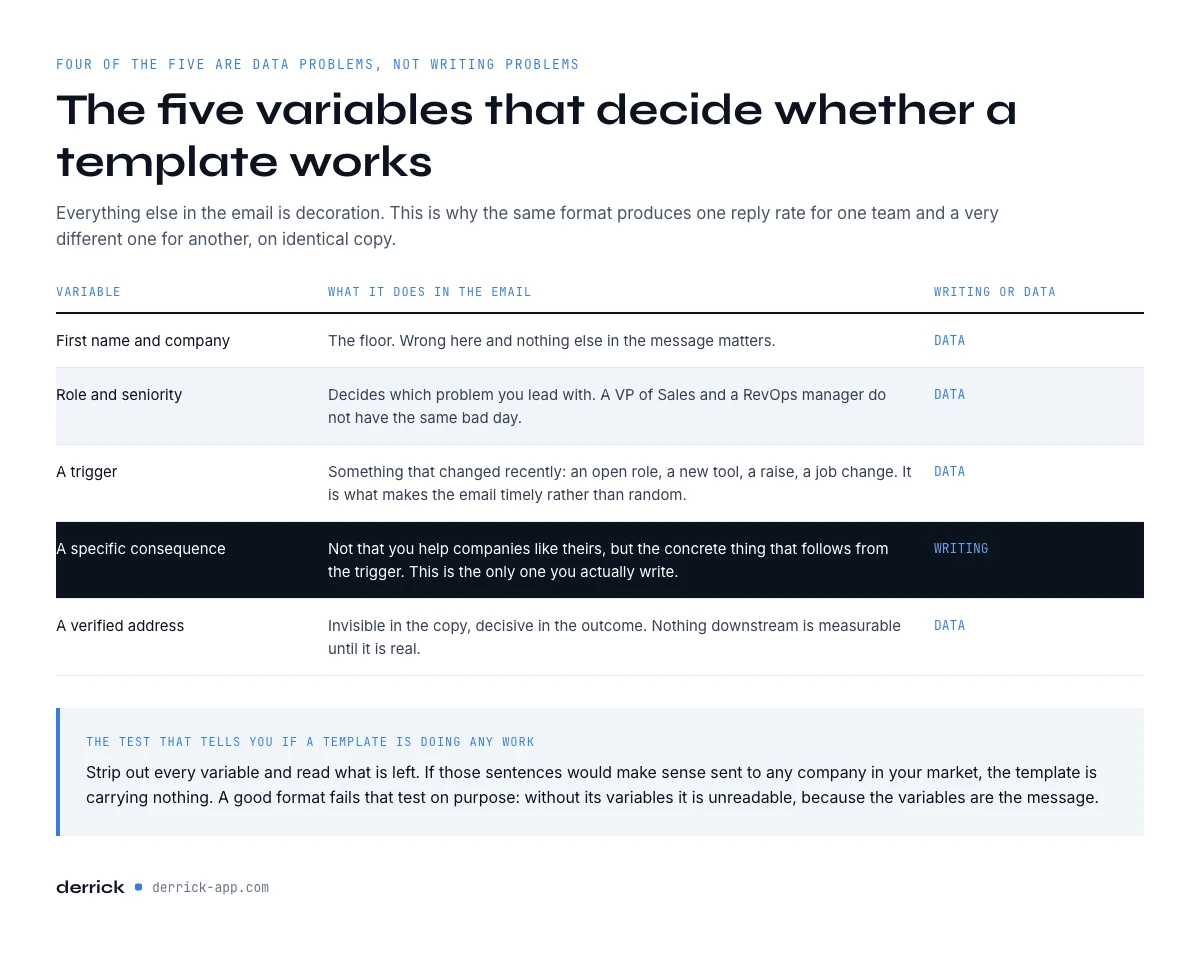
The five variables that decide whether a template works
Across thousands of B2B sequences the same five fields carry almost all of the personalisation weight. Everything else is decoration.
- First name and company. The floor. Wrong here and nothing else matters.
- Role and seniority. Determines which problem you lead with. A VP of Sales and an RevOps manager do not have the same bad day.
- A trigger. Something that changed recently: a role opening, a new tool on the stack, a funding round, a job change. The trigger is what makes the email timely rather than random.
- A specific consequence. Not "we help companies like yours" but the concrete thing that follows from the trigger.
- A verified address. Invisible in the copy, decisive in the outcome.
Four of those five are data problems, not writing problems. That is the part template listicles leave out, and it is the reason the same format produces a 2 percent reply rate for one team and 11 percent for another.
Cold email template 1: the hiring signal
Use when the company is recruiting for a role that implies the pain you solve. A team posting three SDR openings has decided to spend on outbound, which tells you more about their next two quarters than any intent score.
Subject: your {{role}} openings
Hi {{firstName}}, I saw {{company}} is hiring {{count}} {{role}} right now. Usually that means {{consequence}} is about to land on someone's desk. We handle {{specific_part}} for teams at that exact moment, which normally saves the first hire about {{timeframe}} of setup. Worth fifteen minutes before the new people start?
Fields required: firstName, company, role, count, consequence. The hiring data is the only one you cannot guess. Company Hiring Signal returns it for 1 credit per company and is available from the free plan, so this template is testable before you spend anything.
Template 2: the tech stack trigger
Use when what they run tells you what they are missing. Someone with a modern CRM and no enrichment layer has a specific, nameable gap.
Subject: {{tool}} + {{gap}}
Hi {{firstName}}, noticed {{company}} runs {{tool}}. Most teams on it hit the same wall around {{gap}}, usually when the list crosses {{threshold}}. We fix that side of it without touching the {{tool}} setup. Happy to send the two-minute version rather than book anything.
Fields required: tool, gap, threshold. Website Technologies identifies the stack from a domain at 2 credits per website. Note the discipline here: you name the tool they use, never a rival product, and the email offers information rather than a meeting. The meeting comes later.
Cold email template 3: the new in seat opener
Use when someone changed role less than ninety days ago. New arrivals are rebuilding their stack and their budget is unusually available, which is why this format consistently outperforms the others in reply rate while producing fewer, better conversations.
Subject: congrats on the {{newRole}} move
Hi {{firstName}}, congratulations on the move to {{company}}. When people take over {{function}} the first ninety days usually go on {{predictable_problem}}. Here is how three teams in {{industry}} handled it: {{one_line_summary}}. No pitch, just the thing I would want in your first month.
Fields required: newRole, function, industry, plus the change itself. Do not send this at day 200. The whole value is timing, and a stale trigger reads worse than no trigger.
Template 4: the funding or expansion event
Use when the account has just raised, opened an office, or jumped in headcount. The event gives you permission to write, but the event is not the message, so do not spend three sentences congratulating them.
Subject: after the {{event}}
Hi {{firstName}}, saw the {{event}} at {{company}}. The part nobody warns you about is {{second_order_effect}}, which tends to show up around month {{n}}. We work on exactly that. Want the short breakdown of how {{peer_type}} handled it?
Fields required: event, second_order_effect, peer_type. The second order effect is what separates this from the version everyone sends. Anyone can see the funding announcement. Almost nobody says what it will actually break.
Cold email template 5: the direct ask, when you have no signal
Use when there is no trigger at all. Send the honest version rather than manufacturing a fake one, because an invented compliment is detected instantly and costs you the account permanently.
Subject: {{outcome}} at {{company}}?
Hi {{firstName}}, I have no clever reason for this email. We do {{one_sentence}} for {{role}} in {{industry}}, typically getting {{measurable_outcome}}. If that is not a live problem this quarter, say no and I will not follow up. If it is, I will send one page.
Fields required: role, industry, measurable_outcome. This format wins on brevity and on the explicit opt-out, which measurably reduces complaint rates. The complaint rate matters more than the reply rate, because it is what decides whether your next campaign reaches anyone at all.
In the web app or Google Sheets
Write the variable part once, apply it per row
The six formats differ by the data they need, not by the boilerplate. Once the row is enriched, Ask OpenAI runs your prompt on it, in the web app or in the sheet, and returns the personalised line for each prospect in its own column.
- Feature
- Ask OpenAI
- Credit cost
- 1 credit per call
The first button opens the web app (nothing to install): 1 credit per call, available from the STANDARD plan. The second details the feature and its cost per plan.
Template 6: the follow-up that adds something
Use when the first email went out two to four days ago without a reply. Never send "just bumping this to the top of your inbox". A follow-up that carries no new information trains people to ignore your name.
Subject: (same thread)
Hi {{firstName}}, adding one thing rather than chasing. {{new_fact}}. That is the whole reason I thought of {{company}}. If the timing is wrong I will close the loop here.
Fields required: new_fact. One per follow-up. If you cannot produce a new fact, you have run out of reasons to write, and stopping is the correct move.
Cold email template 7: the LinkedIn post engagement opener
Use when someone liked or commented on a post about the problem you solve, yours or a public post in your space. A reaction is a small, public sign of interest in a topic, which is more than most cold lists can claim.
Subject: your comment on {{post_topic}}
Hi {{firstName}}, you {{reaction_type}} on {{post_author}}'s post about {{post_topic}} last week. That usually means {{problem}} is on your list this quarter. We work on {{specific_part}} for {{role}} teams. Want the one-page version of how we approach it?
Fields required: post_topic, reaction_type, post_author. Data that feeds it: Import LinkedIn post likes & comments turns a post into a list of everyone who reacted, with name and profile URL, at 1 credit per engager (only successful rows count). It needs your LinkedIn account connected through the Derrick Chrome extension. Pick posts close to your problem: a post with 300 reactions costs 300 credits. And keep the reference light. Name the topic, never paste their comment back at them.
Template 8: the mutual connection or referral
Use when someone the prospect knows has pointed you to them and agreed to be named. It is the warmest format on this list and the easiest to abuse, so only name a person who actually said yes.
Subject: {{referrer_firstName}} suggested I write
Hi {{firstName}}, {{referrer_fullName}} at {{referrer_company}} suggested I get in touch. We worked together on {{shared_context}}, and {{referrer_firstName}} thought {{company}} might be running into the same thing around {{problem}}. Open to a short call, or should I send the two-line summary first?
Fields required: referrer_fullName, referrer_company, shared_context. Data that feeds it: yours. No enrichment tool knows who would vouch for you, and Derrick does not pretend to. Keep a referrer column in your list, fill it by hand from your own network and your customers, and send this template only to the rows where that cell is filled.
Template 9: the account news hook
Use when the company was in the news recently for something other than funding: a product launch, a new market, a partnership, an award. The news is your reason to write, and its consequence is your message.
Subject: {{news_topic}} at {{company}}
Hi {{firstName}}, I read about {{news_headline}} ({{publisher}}, {{news_date}}). Moves like that tend to put pressure on {{function}} a few weeks later, mostly around {{predictable_problem}}. We take that part off the team's plate. Worth a quick look before it lands?
Fields required: news_headline, publisher, news_date. Data that feeds it: Google News Scraper returns, for each company on your list, its most relevant recent article with title, link, publisher and date, at 1 credit per news item on the paid plans. Read the date column before you send. An article from last spring is not a hook anymore.
Template 10: social proof from the same sector
Use when you already have customers in the prospect's industry and they agreed to be referenced. A peer in the same sector is the proof a buyer trusts most, as long as it is real.
Subject: how {{industry}} teams handle {{problem}}
Hi {{firstName}}, we work with {{customer_reference}} in {{industry}} on {{specific_part}}. What they kept running into before was {{shared_problem}}, and I suspect it looks familiar at {{company}}. Happy to share what changed for them, in one paragraph.
Fields required: industry, customer_reference, shared_problem. Data that feeds it: your own customer list, matched to the prospect's sector. Derrick can fill the industry column on the prospect side with Enrich Companies (1 credit per company), but the reference itself comes from you. Never invent a customer or a result. One fake claim, once checked, ends the conversation and the account.
Template 11: the breakup email
Use when a sequence has run its course: three or four touches, each adding a fact, and no reply. The breakup closes the loop politely, and it is surprisingly often the email that finally gets an answer.
Subject: closing the loop
Hi {{firstName}}, I have written {{touch_count}} times about {{problem}} and have not heard back, which usually means it is not a priority right now. I will stop here. If that changes, reply with one word and I will send {{offer}}. Either way, good luck with {{current_initiative}}.
Fields required: touch_count, current_initiative. Data that feeds it: the history in your sending tool for touch_count, since it knows how many steps ran, plus one fact you already used earlier in the sequence. Send it once. A breakup followed by yet another follow-up wrecks the credibility of everything before it.
Template 12: re-engaging an old lead
Use when a lead talked to you months ago, went quiet, and something has changed on their side since. Your CRM says why it stalled. A fresh signal says why now.
Subject: {{company}}, {{months}} months later
Hi {{firstName}}, we spoke in {{last_contact_month}} about {{old_topic}}, and the timing was not right then. Since then {{company}} has {{new_trigger}}, which is usually when {{problem}} comes back. Worth a fresh look, or should I leave it?
Fields required: last_contact_month, old_topic, new_trigger. Data that feeds it: your CRM history for the first two. The new trigger comes from Company Hiring Signal (new openings, 1 credit per company) or Website Technologies (a tool added or dropped, 2 credits per website). If neither shows a change, the lead is not ready, and you just saved a send.
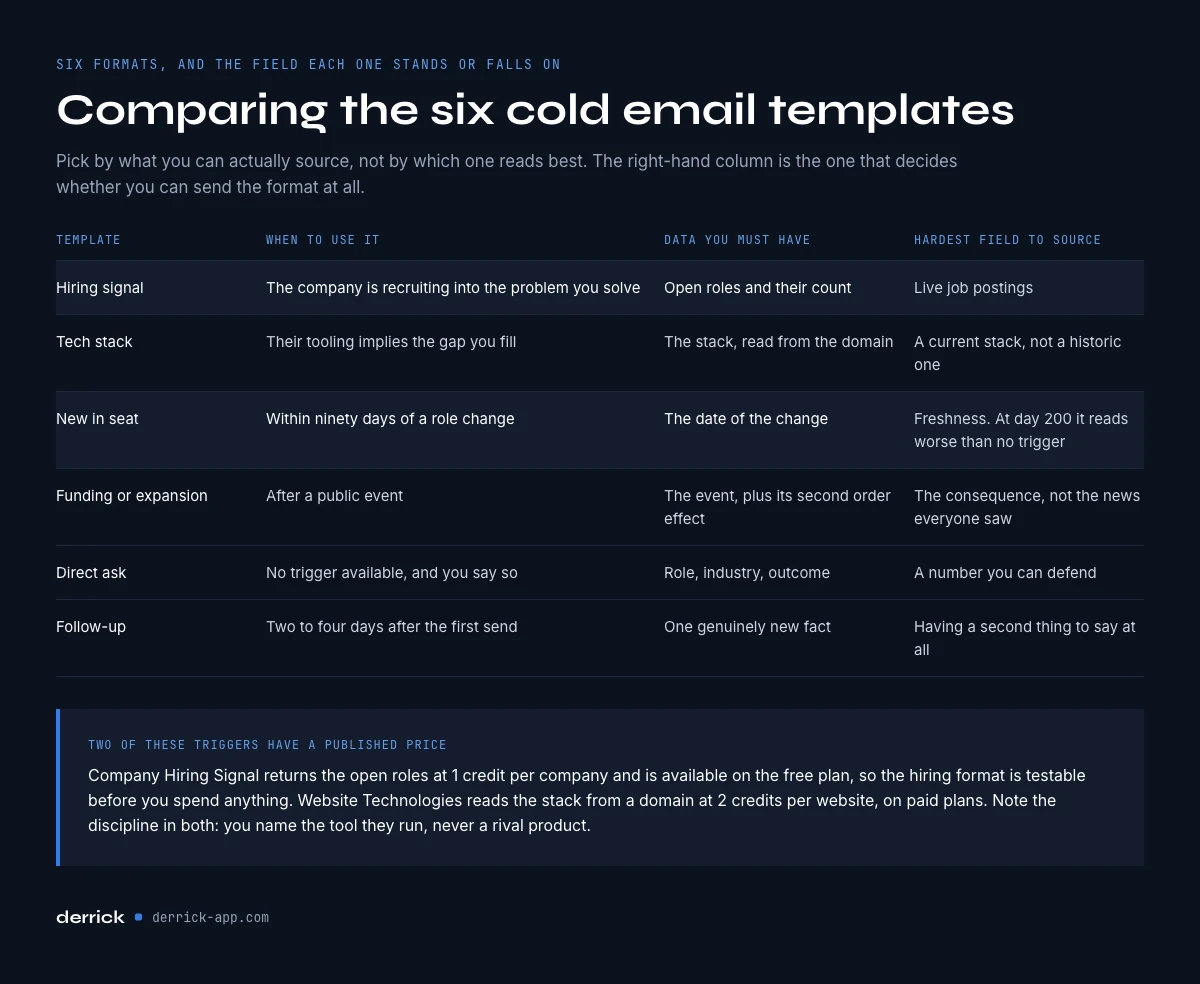
Comparing the twelve cold email templates
| Template | Trigger: when to use | Subject line | Data you must have | Hardest field to source |
|---|---|---|---|---|
| 1. Hiring signal | Company is recruiting into your problem | your {{role}} openings | Open roles, count | Live job postings |
| 2. Tech stack | Their tooling implies the gap | {{tool}} + {{gap}} | Stack from domain | Current, not historic, stack |
| 3. New in seat | Within 90 days of a role change | congrats on the {{newRole}} move | Job change date | Freshness of the change |
| 4. Funding or expansion | After a public event | after the {{event}} | Event plus second order effect | The consequence, not the news |
| 5. Direct ask | No trigger available | {{outcome}} at {{company}}? | Role, industry, outcome | A number you can defend |
| 6. Follow-up | 2 to 4 days after send one | (same thread) | One genuinely new fact | Having a second thing to say |
| 7. Post engagement | They reacted to a post on your topic | your comment on {{post_topic}} | Post, reaction, author | A post close enough to your problem |
| 8. Mutual connection | Someone they know agreed to be named | {{referrer_firstName}} suggested I write | Referrer, shared context | A real yes from the referrer |
| 9. Account news | Recent launch, market, partnership | {{news_topic}} at {{company}} | Headline, publisher, date | News recent enough to matter |
| 10. Same-sector proof | You have customers in their industry | how {{industry}} teams handle {{problem}} | Industry, customer reference | Permission to name the customer |
| 11. Breakup | Sequence over, no reply | closing the loop | Touch count, current initiative | Stopping after sending it |
| 12. Old lead | Past conversation plus a new trigger | {{company}}, {{months}} months later | CRM history, new trigger | Proof that something changed |
Three frameworks behind every cold email template: AIDA, PAS, quick question
Each format above sits on one of three older structures. Knowing which one you are using helps when a template underperforms, because each framework fails in its own way.
AIDA: attention, interest, desire, action
The classic advertising sequence. In a cold email, attention is the trigger in the first line, interest is the consequence you name, desire is the specific outcome, and action is one low-effort ask. Templates 1, 3, 7 and 9 follow it. It fails when the first line is generic, because nothing after it gets read.
PAS: problem, agitate, solution
Name a problem, make its cost concrete, then offer the fix. Templates 2, 4 and 10 lean on it: the stack gap, the second order effect and the peer's old pain are the agitation. It fails when the problem is guessed rather than observed, which is why each of those templates asks for a data field before the problem line.
The quick question
One short question the reader can answer in a word, with no pitch around it. Templates 5, 8, 11 and 12 use it. It works because replying costs almost nothing, and it fails when the question is rhetorical, like asking whether they would like more revenue.
Choose the framework by the data you hold. A strong trigger supports AIDA, an observed gap supports PAS, and no data at all leaves you with the honest quick question.
Cold email examples, annotated
Templates are skeletons. Here are two cold email examples with every variable filled, for a fictional sender and a fictional account, so you can see the finished message and why each piece is there.
Example 1, built on template 1 (hiring signal)
Subject: your 3 SDR openings
Hi Claire, I saw Acme Logistics is hiring 3 SDRs right now. Usually that means building their first prospect lists is about to land on someone's desk. We handle list building for teams at that exact moment, which normally saves the first hire a couple of weeks of setup. Worth fifteen minutes before the new people start?
- "3 SDRs" comes from the hiring data, the one field nobody can guess.
- The consequence names a task the new hires will own, not a feature of the product.
- One ask, sized at fifteen minutes and timed before the hires start.
- Length: around 60 words, inside the 50 to 125 word band.
Example 2, built on template 9 (account news)
Subject: the Lisbon office at Acme
Hi Marc, I read about Acme's new Lisbon office (regional business press, last Tuesday). Moves like that tend to put pressure on finance ops a few weeks later, mostly around invoicing in a second country. We take that part off the team's plate. Worth a quick look before it lands?
- Headline, publisher and date come from the news column, not from memory, so the reader can tell you actually read it.
- The predictable problem follows from the event itself: a new country means new invoicing rules.
- No congratulations paragraph. The news earns the right to write, it is not the message.
What these cold email examples share: remove the variables and the remaining text says almost nothing. That is the test from the start of this guide, passed on purpose.
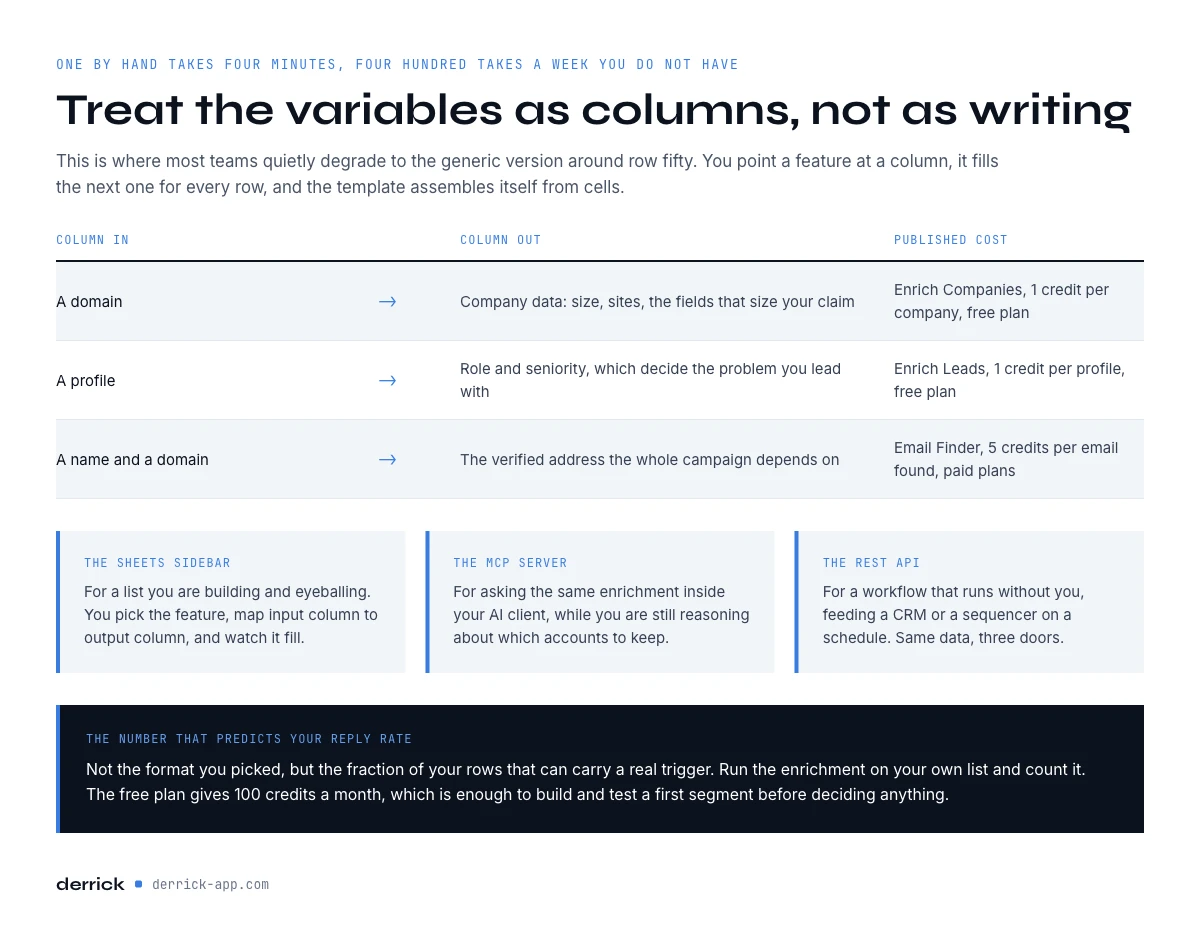
Filling the variables for a whole list at once
Writing one of these by hand takes four minutes. Writing four hundred takes a week you do not have, which is why most teams quietly degrade to the generic version by row fifty.
The fix is to treat the variables as columns rather than as writing. In the Derrick web app or its Google Sheets sidebar, you point a feature at a column and it fills the next one for every row: domains in, company data out; profiles in, roles and seniority out; names and domains in, verified addresses out. The template then assembles itself from cells.
Four surfaces do the same job, and the right one depends on where you already work. The web app suits a list you import and work on in the browser, with nothing to install. The Google Sheets sidebar suits a list you are building and eyeballing in a spreadsheet. The MCP server suits asking for the same enrichment inside Claude or another AI client while you are reasoning about the accounts. The REST API suits a workflow that has to run without you, feeding a CRM or a sequencer on a schedule. Same data, four doors.
Costs are per unit and published: Enrich Companies at 1 credit per company and Enrich Leads at 1 credit per profile, both available from the free plan once your LinkedIn account is connected through the Derrick Chrome extension, and Email Finder at 5 credits per email, charged only when an address is actually found. The free plan gives 100 credits per month, which is enough to build and test a first segment before deciding anything.
Try the enrichment side of this on your own list and see what fraction of your rows can carry a real trigger. That percentage, more than any format, predicts your reply rate.
Why a good template still bounces
Deliverability failures wear the costume of a copy problem. No replies looks identical whether your message went to spam, hit a dead mailbox, or simply bored someone. Only one of those three is fixed by rewriting.
Work backwards through the layers before touching the text. Check authentication on the sending domain. Check the bounce rate: above roughly 2 percent you are damaging the domain with every send, and above 5 percent you are actively burning it. Then check whether the addresses were verified at all, because guessed patterns are the single largest source of bounces in B2B outbound.
Verification is cheap relative to the damage it prevents. Email Verification costs 1 credit per email, against a burned domain that costs weeks of recovery. Our own reference numbers on what to expect from a clean list are in the 2026 cold email benchmarks, and the mechanics of why lists rot are covered in the bounce checker guide.
Spam-filter checklist for any template
- SPF, DKIM and DMARC pass on the sending domain. The SPF record check covers the first one.
- Every address on the list was verified recently, not months ago.
- At most one link and no attachment in the first email.
- No image-only body and no link shorteners.
- Plain text or close to it: the variables carry the message, not the formatting.
- An easy way to say no, as in template 5.
- Sending volume ramps up gradually on a new domain.
The complete list, in the order to fix things, is in the cold email deliverability checklist.
What to measure once the templates are live
Four numbers, in this order. Bounce rate tells you whether the list is real. Complaint rate tells you whether you are allowed to keep sending. Reply rate tells you whether the format works. Positive reply rate tells you whether the targeting works. Teams that watch only the third number optimise copy for an audience that was wrong from the start.
Give a format at least two hundred sends before judging it, and change one variable at a time. Swapping the subject line and the opening paragraph together produces a result you cannot attribute to either. If you want the percentile bands for each metric rather than a rule of thumb, the benchmark report linked above has them by segment.
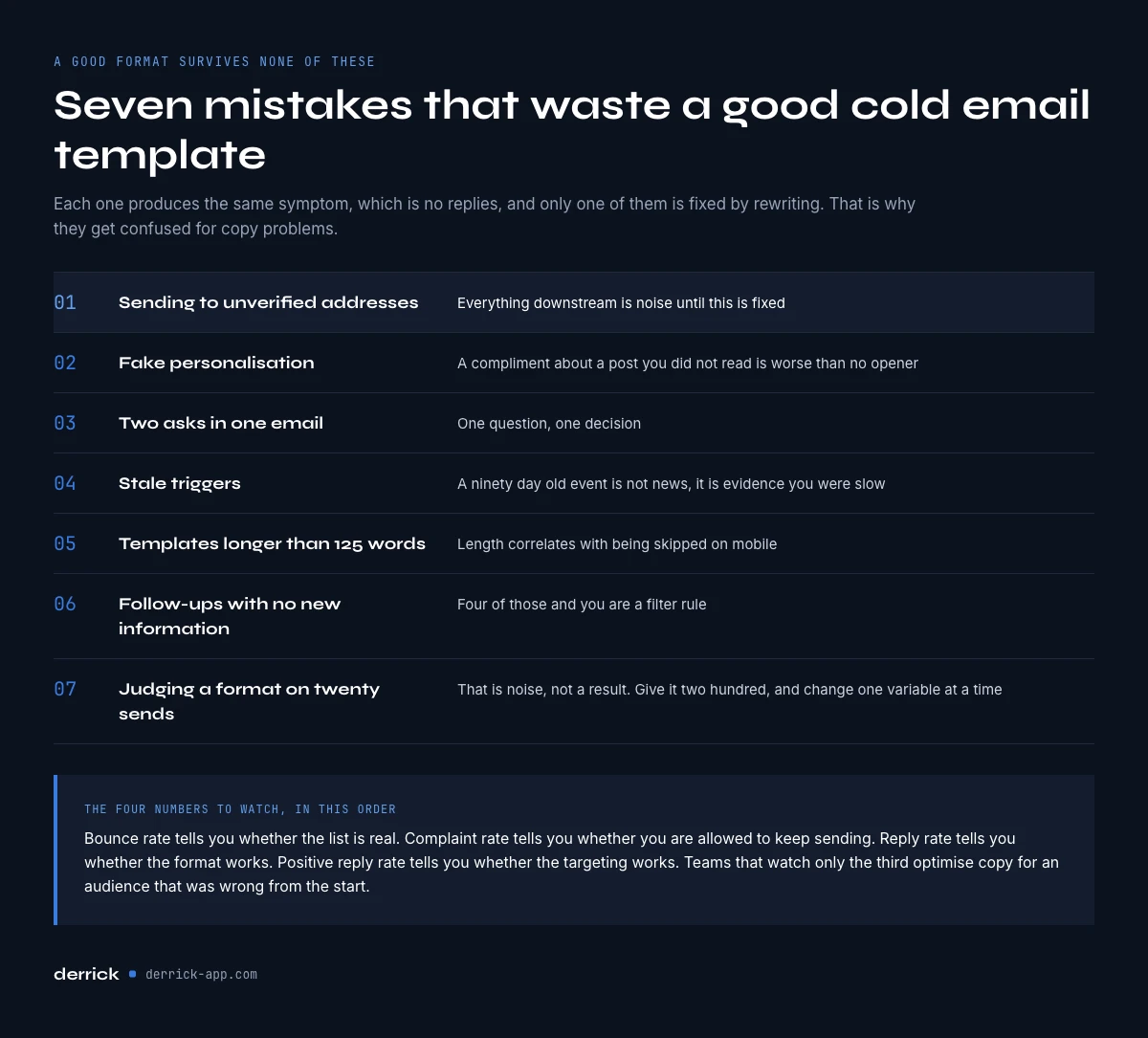
Seven mistakes that waste a good cold email template
- Sending to unverified addresses. Everything downstream is noise until this is fixed.
- Fake personalisation. A compliment about a blog post you did not read is worse than no opener.
- Two asks in one email. One question, one decision.
- Stale triggers. A ninety day old event is not news, it is evidence you were slow.
- Templates longer than 125 words. Length correlates with being skipped on mobile.
- Follow-ups with no new information. Four of those and you are a filter rule.
- Judging a format on twenty sends. That is noise, not a result.
Where to go next
If your bounce rate is above 2 percent, none of these formats will help until that is fixed, so start with the list. If your bounce rate is healthy and replies are still flat, the problem is the trigger rather than the wording, and the trigger templates (one to four, then seven, nine and twelve) are where to spend your attention. If you are starting from nothing, take the direct ask, send two hundred, and use the result as your baseline.
We publish one edition of the Derrick newsletter every two weeks with the enrichment and outbound work we are actually doing, including the numbers that did not work. Subscribe from the site if you want that rather than another template list.
Frequently asked questions
What is a cold email template?
How long should a cold email template be?
What is the best cold email template for B2B sales?
Do cold email templates still work in 2026?
How many templates should a sequence use?
What data do I need before using a cold email template?
How much does it cost to fill template variables with Derrick?
Should I personalise every email by hand?
Keep reading
Continue exploring this cluster


Cold Email Subject Lines: 20 Formats and the Data Each Needs
Read →
Email Deliverability Checklist: 15 Controls, Sorted by Cadence
Read →

Best Time to Send Cold Emails: What the Data Says (2026)
Read →

SPF Record Check: Read Yours and Count the Lookups (2026)
Read →