
Lead Scoring Software: A Score Is Only Its Fields
Find the best lead scoring software by category, judge each tool by the data it needs, and learn how to repair the inputs before you buy.


Lead scoring software ranks your leads so your reps work the list from the top instead of from the middle. Every tool in the category does the ranking part well. What separates a scoring deployment that survives its first quarter from one that quietly gets ignored is not the engine, it is what you can feed it: a score is a function of fields, and a field you do not have does not score as zero, it scores as wrong.
So this guide evaluates lead scoring software the way you would evaluate a kitchen rather than a chef. We go criterion type by criterion type, firmographic, behavioural, intent and relational, and for each one we name the data it requires, what the score does when that data is missing, how fast that data goes stale, and what it costs to fill. If you are deciding which tool to buy, the shortlist you end up with will be shaped more by this than by any feature matrix. Most lead scoring tools help you judge your data. This guide also shows how to repair it: the contract between enrichment and score, what it costs to feed the model, and the field that looks filled and is not.
What lead scoring software actually is
Lead scoring software assigns a number, a letter or a tier to each lead and account, so that routing, prioritisation and follow-up can be automated against it. It reads attributes about who the lead is and events about what the lead did, applies rules you wrote or a model trained on your closed-won history, and writes a score back to the record.
Lead scoring software comes in three families, and the distinction is real. Rule-based scoring adds and subtracts points you defined: plus fifteen for a director title, minus ten for a free email domain. Predictive lead scoring trains on your historical outcomes and infers the weights itself. Rule-based is transparent and reflects your bias. Predictive is more accurate and reflects your data coverage, which is a different bias and a less visible one.
The third family is newer: AI or hybrid scoring, where a language model reads each record against a rubric you wrote and returns a score with a sentence of reasoning, often blended with rules or a predictive model. AI lead scoring is useful where the signal sits in text a points rule cannot parse, such as a job description, the copy on a company's website or a news item. It needs no training history, but it inherits every gap in the fields you hand it, exactly like the other two.
| Family | What it needs | When to use it | Where it breaks |
|---|---|---|---|
| Rule-based | Clean company and title fields, a few tracked events | Low volume, a new motion, or no closed-won history yet | Weights reflect your assumptions, and empty fields score as average |
| Predictive | Hundreds of past leads with a clear converted or lost outcome | Steady inbound volume and a stable definition of a win | Learns your enrichment pattern when coverage is uneven |
| AI or hybrid | A written rubric, plus the fields and text the model reads | Account lists, outbound, signals buried in free text | Confident output on thin input, and a cost per record scored |
None of the three fixes missing data. Predictive lead scoring and AI scoring are often sold as the cure for a sparse database. In practice they are the two families that hide sparseness best, because the output still looks like a precise number.
Scoring, grading and routing
A score usually means engagement: what the lead did. A grade usually means fit: who the lead is. Many tools compute both and combine them, which is the right shape, because a perfect-fit account that has done nothing and a poor-fit account that downloaded everything need very different treatment and a single blended number hides both. Routing is the automation that consumes the result. Buying lead scoring software without deciding what the routing will do with the output is the most common way to end up with a number nobody acts on.
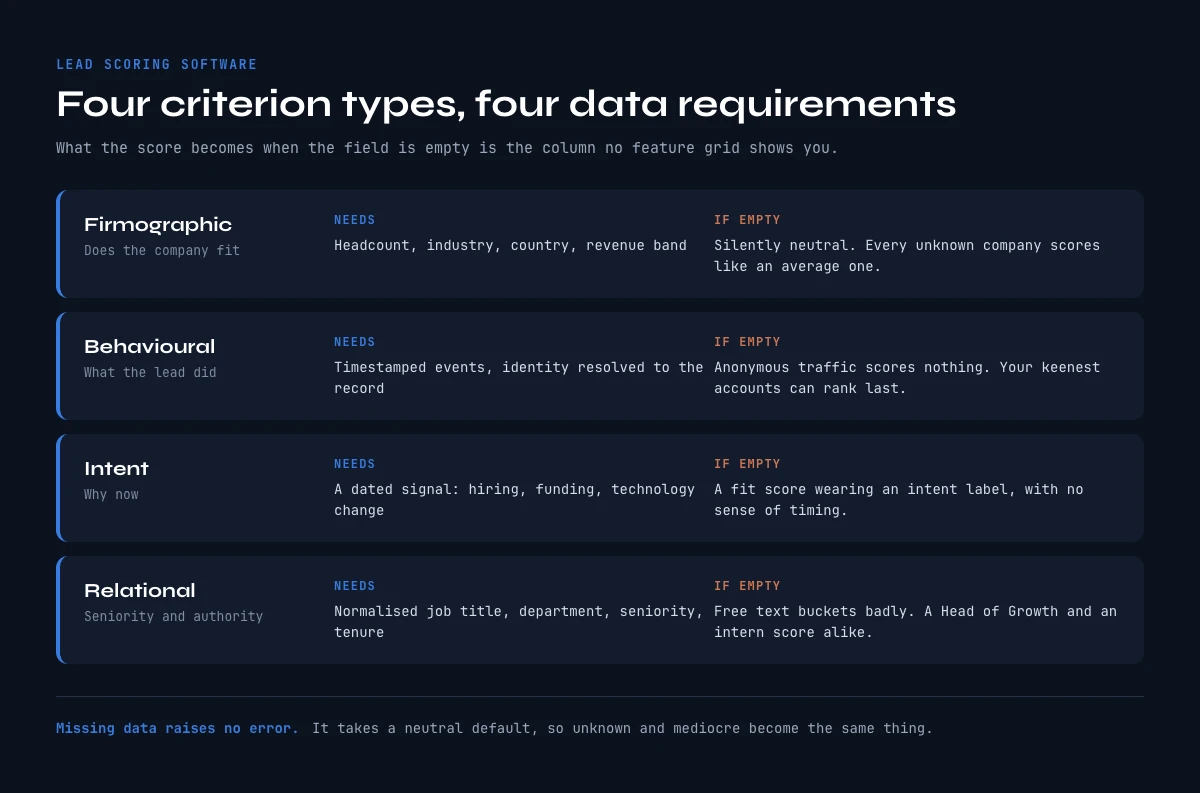
The four criterion types, and the data each one needs
Evaluate any lead scoring software against this table before you look at its interface. The third column is the actual system requirement. The fourth is what happens on the records where you do not meet it, which in most databases is a large minority of them.
| Criterion type | What it measures | The data it requires | What the score becomes when the field is empty |
|---|---|---|---|
| Firmographic | Whether the company fits your ICP | Headcount, industry, country, revenue band, legal entity | Silently neutral, so every unknown company is scored like an average one |
| Behavioural | What the lead did, and how recently | Tracked events with timestamps, identity resolution back to the record | Anonymous traffic scores nothing, so your most interested accounts can rank last |
| Intent | Whether the account is in market now | A dated signal the buyer emits: hiring, funding, technology change, research activity | The score becomes a fit score wearing an intent label, with no sense of timing |
| Relational | Seniority, role and buying authority | Normalised job title, department, seniority, tenure | Free-text titles bucket badly, so a Head of Growth and a growth intern can score alike |
The important column is the fourth one, and it is the one no vendor comparison shows you. Missing data does not raise an error in lead scoring software. It takes a default, and defaults are almost always neutral, which means every record you know nothing about is treated as mediocre rather than unknown. That is not a rounding problem. It systematically buries the accounts you have not enriched yet, which are frequently the new ones.
Firmographic criteria: the half that is easiest to fix
Firmographics are the fit backbone that lead scoring software leans on hardest: size, sector, geography, maturity. They are also the most commonly incomplete, because they usually arrive from a web form where the visitor typed a company name and nothing else, or from a list import that carried three columns.
The failure mode here is specific and worth naming. When industry is blank on a third of your records, a rule that awards points for target industries awards them only to the records that happen to be filled, so your score quietly becomes a measure of how completely a record was captured rather than how well the company fits. Enrichment coverage becomes the hidden variable, and it correlates with nothing you care about.
How stale it goes: slowly. Industry and country rarely change. Headcount moves enough over a year to matter for a banding rule, so an annual refresh is usually enough.
What it costs to fill: filling company attributes with Enrich Companies costs 1 credit per company, on the free plan included, once your LinkedIn account is connected through the Derrick Chrome extension. Because companies are far fewer than contacts, this is the cheapest line item in the whole exercise and the one that moves the score the most.
Behavioural criteria: accurate, and narrower than it looks
Behavioural scoring is the part of lead scoring software that works best out of the box, because the tool generates its own input. Page views, email opens, demo requests, pricing page visits: the events are captured by the same system that scores them, so coverage is complete by construction.
The limit is not accuracy, it is population. Behavioural scoring can only rank people who already identified themselves. The account researching you anonymously for three weeks scores zero until someone fills in a form, which means a purely behavioural model ranks your known leads beautifully and is blind to your pipeline's actual top of funnel. Teams discover this when the model's top ten looks like a list of newsletter subscribers.
The second limit is decay. An email open from March is not evidence about today. Any behavioural criterion without a time decay rule accumulates points forever and eventually every long-lived record outranks every new one. If a tool you are evaluating cannot express decay, that is a genuine disqualifier, and it is worth more than three features on a comparison grid.
How stale it goes: fast. Behavioural relevance is measured in days and weeks. What it costs to fill: nothing extra, it comes with the tool. This is the one criterion type you do not buy data for.
Intent criteria: the only ones that answer "why now"
Fit tells you whether to talk to an account. Intent tells you whether to talk to it this week. Most lead scoring software sells intent as a premium add-on, and most teams buy it before they have fixed the firmographic half, which is the wrong order: an intent signal on an account you cannot qualify just makes you fast in a random direction.
Intent has one property that separates the useful signals from the decorative ones: a usable intent signal is dated. A company that posted three sales roles this month is a fact with a timestamp attached to it. A company that "shows interest in your category" is a score whose provenance and date you cannot inspect, and you cannot write a first sentence from it.
Two dated signals are cheap to resolve yourself. Hiring activity, through Company Hiring Signal at 1 credit per company, tells you an account is building the function you sell into. Technology changes tell you a stack moved. Both are verifiable, both carry their own date, and both survive the question a manager will eventually ask, which is "why is this account at the top".
How stale it goes: very fast, and this is the criterion most worth automating on a cadence. A hiring signal from four months ago is not an intent signal, it is history.
Relational criteria: the field that looks filled and is not
Seniority and department decide whether the person can buy. This is the criterion most likely to be present in your CRM and still useless, and it is where lead scoring software quietly loses precision, because job titles arrive as free text. "Head of Revenue Operations", "RevOps Lead", "Sr. Manager, Revenue Ops" and "revops" are four strings describing one role, and a points rule matching on a keyword list catches some and misses others without telling you which.
This is why title normalisation deserves an explicit question during an evaluation. Ask a vendor how their scoring handles title variants, and whether normalisation happens before scoring or not at all. It is a five-minute question that predicts more about your results than the demo does.
How stale it goes: moderately, and invisibly. People change roles inside the same company without any event reaching your CRM, so a title field ages without ever looking wrong.
What it costs to fill: refreshing a contact's role with Enrich Leads costs 1 credit per profile, free plan included. Note that this is per contact rather than per company, so it is the line that scales with your database size.
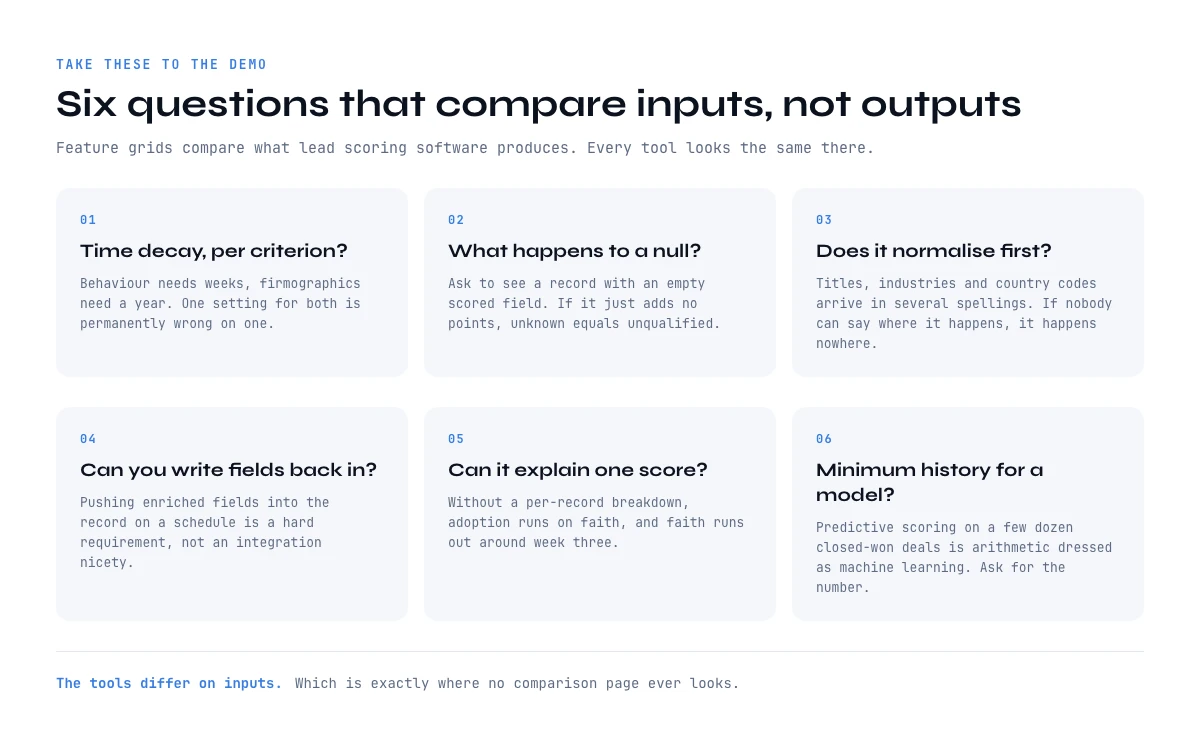
How to evaluate lead scoring software by its inputs
Feature grids compare the outputs of lead scoring software, which all look similar. These eight questions compare inputs, which is where the tools actually differ. Take them to a demo.
Can it express time decay, per criterion? Not a global expiry, a per-criterion half-life. Behaviour needs weeks, firmographics need a year. A tool with one setting for both will be wrong on one of them permanently.
What does it do with a null, explicitly? Ask to see a record where a scored field is empty. If the answer is "it just does not add points", you now know unknown and unqualified are the same thing in this system, and you can plan around it.
Does it normalise before it scores? Titles, industries and country codes all arrive in several spellings. Normalisation is either in the product or it is in your ETL, and if nobody can say which, it is nowhere.
Can you write fields back in? The score is only as good as its inputs, so the ability to push enriched fields into the record on a schedule, by API or otherwise, is a hard requirement rather than an integration nicety.
Can it explain a single score? A per-record breakdown showing which criteria contributed is what lets a rep trust the ranking. Without it, adoption depends on faith, and faith runs out around week three.
What is the minimum history a predictive model needs? Ask for the number, and compare it honestly to what you have. The CRMs publish theirs. The Einstein Lead Scoring setup requirements at Salesforce ask, for each lead segment, for at least 1,000 leads created in the last 200 days, of which at least 120 were converted. HubSpot's lead scoring documentation asks for a sample of at least 50 contacts, 25 converted and 25 not converted, before its AI scoring produces a score. Below those floors, predictive lead scoring is arithmetic dressed as machine learning.
How fast does the score update? Ask what happens between a field changing and the score changing: seconds, an hourly job or a nightly batch. A hiring signal that lands on Monday and moves the score on Thursday has lost most of its value, because intent is the criterion that goes stale fastest.
Does the score trigger anything? A score that only sorts a view relies on a rep remembering to look at it. Ask whether crossing a threshold can assign an owner, create a task, send an alert or enrol the lead in a sequence, and whether a falling score can undo it. If the answer is a dashboard, budget for the automation separately.
Best lead scoring software by category, and what each one needs
Most lists of the best lead scoring software rank vendors. A more useful cut for a buyer is by category, because the category decides what data you have to bring, and the data decides whether the score will be real. Lead scoring tools fall into four groups.
| Category | Examples | Data you must bring | Setup effort | Typical price range |
|---|---|---|---|---|
| DIY scoring on an enriched list | Derrick (web app, Google Sheets, MCP, API) | A target list, a written rubric, enriched company and contact fields | Hours | Free plan at 0 euros with 100 credits a month; the AI scoring step on paid plans from 20 euros a month |
| CRM-native scoring | HubSpot, Salesforce | Clean CRM properties and tracked events; for predictive, the outcome history above | Days to weeks | Bundled in the upper CRM tiers, often several hundred dollars a month and up at team scale |
| Standalone predictive scoring | Dedicated predictive vendors | Months of lead history with a clean converted or lost outcome, plus a CRM sync | Weeks | Usually annual contracts, from a few hundred to a few thousand dollars a month |
| Intent and ABM platforms | 6sense, Demandbase | A target account list, website traffic, and a budget for third-party intent data | One to three months | Typically five-figure annual contracts and up |
Third-party price ranges are indicative, observed on published pricing in October 2026; they move with seats and volume.
CRM-native scoring is the default for a reason: the score lives on the record your reps already open, and routing can read it without an integration. HubSpot and Salesforce both offer rule-based scoring and a predictive or AI option on their higher tiers. The catch is the one this guide keeps coming back to: the model can only read properties the CRM holds, so the fill rate of those properties decides the result.
Standalone predictive lead scoring earns its price when you have volume and history: thousands of leads a quarter and a clean converted or lost outcome on each. Without that history it falls back to rules, and you have paid for a model you cannot train.
Intent and ABM platforms such as 6sense or Demandbase score accounts rather than people, on aggregated research signals. They answer which accounts are in market, and they still leave you to find, verify and enrich the people inside those accounts before anyone can be contacted.
DIY scoring on an enriched list is the category most comparisons skip. You build or import the population, enrich the fields your rubric reads, and score each row with an AI step and a written grid. It suits outbound teams, account lists that are not in the CRM yet, and anyone who wants to see exactly why a row scored high. The section on building your own lead scoring agent, further down, walks through it step by step.
Whichever category you choose, the best lead scoring software for your team is the one whose data requirements you can actually meet this quarter.
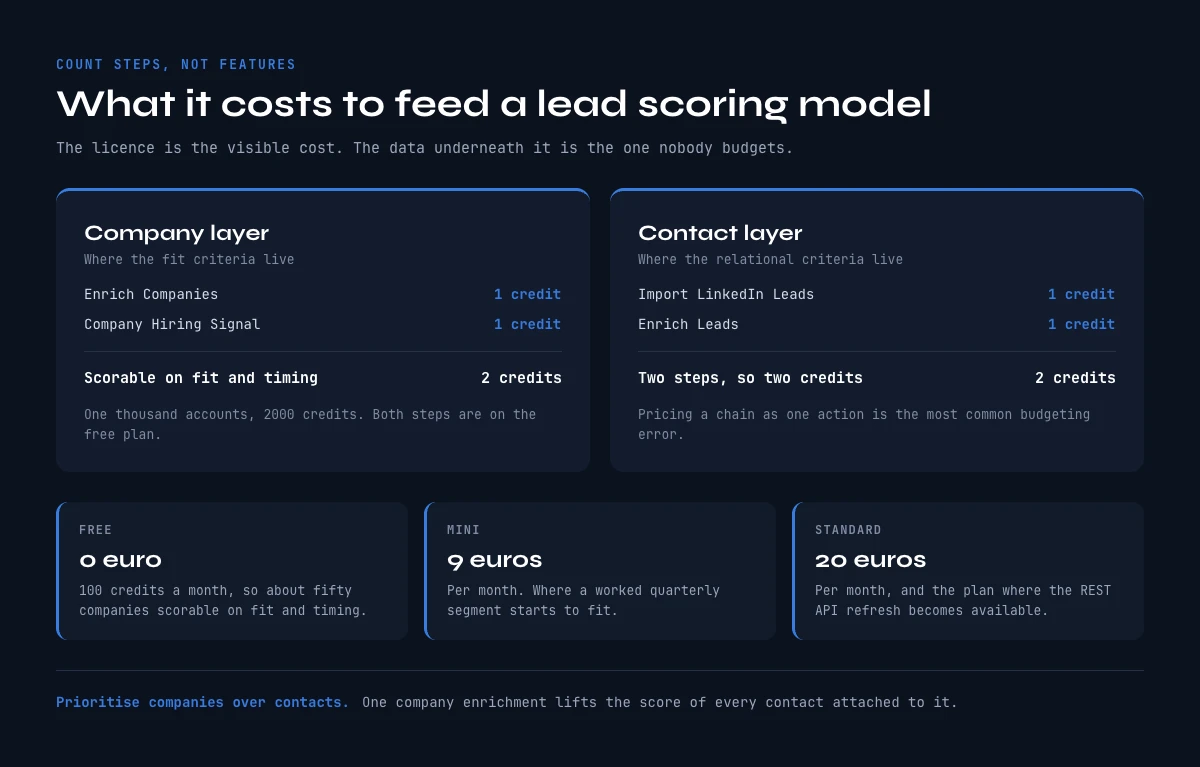
What lead scoring software costs to feed
The licence is the visible cost of lead scoring software. The invisible one is the data underneath it. Here is that arithmetic, using public prices and counting steps rather than features, because the most common budgeting error is to price a chain as though it were one action.
Start with the company layer, because it is where the fit criteria live and where the cost per unit is lowest. Enriching a company costs 1 credit. Adding a hiring signal costs 1 more credit per company. So a company made scorable on both fit and timing costs 2 credits, and a thousand accounts cost 2000 credits.
The contact layer scales differently. If you are importing profiles rather than starting from a list you already own, Import LinkedIn Leads costs 1 credit per profile, and enriching each one costs 1 more. That is two steps and therefore 2 credits per contact, not 1. On the free plan, 100 credits a month at zero euros makes roughly fifty contacts scorable, or fifty companies scorable on both fit and timing. Paid plans start at 20 euros a month on STANDARD, with the cost per credit falling as volume rises.
Two practical notes. First, prioritise companies over contacts: a company enrichment improves the score of every contact attached to it, so the same credit does more work. Second, enrich the segment you are actually going to work this quarter rather than the whole database. Scoring quality is a coverage problem within the population you touch, not a completeness trophy across a base where most records will never be called.
If you need to build the target population itself rather than enrich an existing one, Import Companies from a Prompt at 1 credit per company with your LinkedIn account connected (10 without) and Find Similar Companies at 1 credit per company build a list from a description or from your best existing customers, which is a more honest starting point for a fit model than a database export nobody chose.
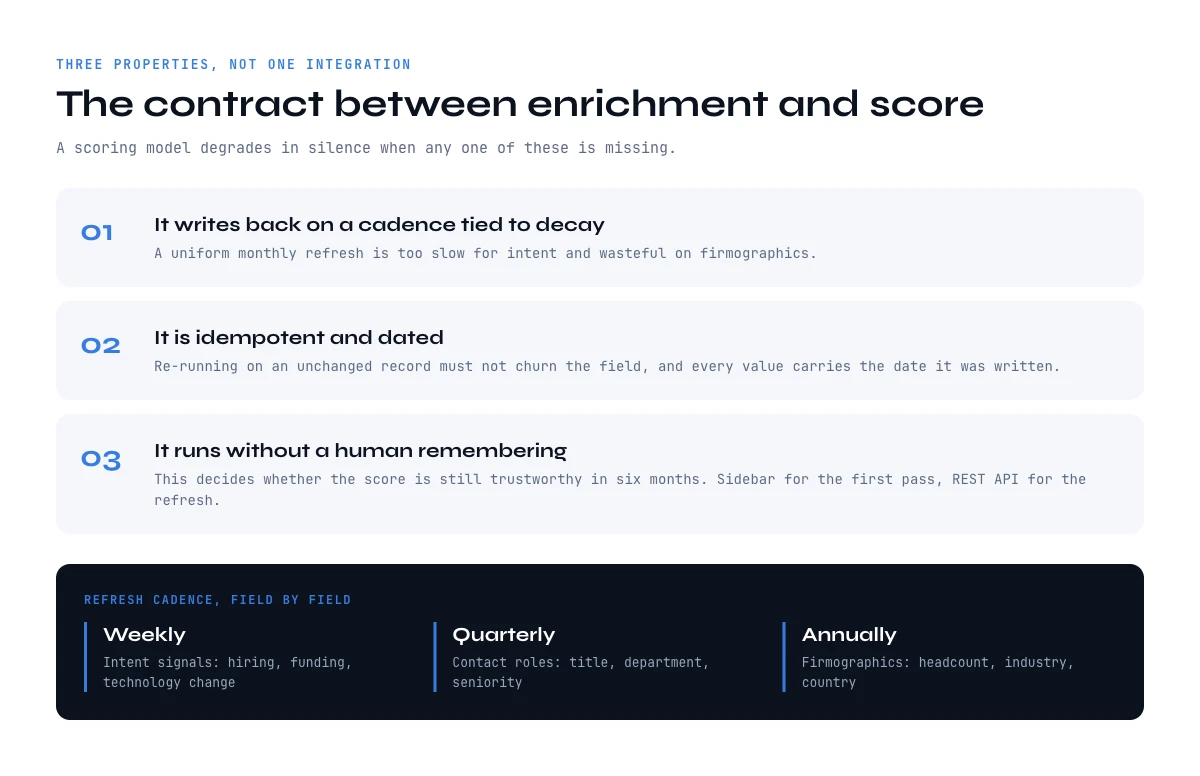
The contract between your enrichment and your score
Lead scoring software recalculates continuously, so the layer that fills its fields has to satisfy three properties rather than simply exist. Whatever tool you use for the filling, check it against these, because a scoring model degrades in silence when any one of them is missing.
It writes back on a schedule tied to decay, not to the calendar. Weekly for intent, quarterly for contact roles, annually for firmographics. A monthly refresh applied uniformly is simultaneously too slow for the first and wasteful on the third. Setting that cadence field by field is what our guide on CRM data strategy works through, and CRM contact management has the one-hour audit that tells you where you stand before you set it.
It is idempotent and dated. Re-running it on an unchanged record must not churn the field, and every field it writes should carry the date it was written, otherwise you can never tell a fresh value from a two-year-old one and neither can the model.
It can run without a human remembering. This is the property that decides whether the score is still trustworthy in six months. A REST API call from your CRM automation when a record is created or a refresh falls due, available from the PLUS plan, is what makes the difference between a scored database and a database that was scored once. The web app and the Google Sheets sidebar cover the first pass and the audit, where you discover which fields were actually missing, and those are usually not the ones you assumed.
For one account at a time, use the MCP. A scheduled refresh belongs in the API, but the question a rep or a founder actually asks is often about a single company: should we work this account now? With the Derrick MCP server connected to Claude, ChatGPT or any MCP client, you ask it in plain language. The assistant pulls the company's firmographics and the people in its buying team through Derrick, then scores the account against the rubric you paste into the chat, field by field, and says which fields it could not fill. It is the same data the API writes back to the CRM, used on demand rather than on a schedule. The MCP and the API both come with the PLUS plan, at 47.50 euros a month.
Our sister guide on HubSpot lead scoring goes through this same plumbing inside one named CRM, property by property, if that is the implementation you are heading for.
Build your own lead scoring agent on an enriched list
The comparisons that top this search often end with a build-your-own option, and for good reason: a lead scoring agent is now a few hours of work rather than a data science project. The version that holds up is not the one with the cleverest prompt. It is the one that scores rows whose fields were filled first.
Step 1: build or import the list. Start in the Derrick web app with the accounts you want to rank: a CSV import of your own list, or a lookalike list built from your won customers with Find Similar Companies.
Step 2: enrich the fields the rubric will read. Run Enrich Companies on the company layer (headcount, industry, country, description) and Enrich Leads on the contacts (current title, seniority), at 1 credit per row each. Add a hiring signal if timing matters to you. Then check the fill rate column by column before going further: a rubric applied to an empty column scores the emptiness.
Step 3: write the grid in plain words. Three to five criteria, each with what earns points and what loses them, and an explicit instruction for a missing field, such as "if headcount is empty, answer unknown, do not guess". That last line is what separates an agent you can trust from one that invents a plausible number.
Step 4: score every row with Ask Claude. Ask Claude applies your grid to each row and writes back a score and a one-line reason, at 2 credits per row. Ask Claude is reserved for paid plans: it is not available on the free plan, so this step starts on a paid plan, from 20 euros a month on STANDARD. It runs in the web app, or in the Google Sheets sidebar if your list already lives in a sheet.
This is AI lead scoring in its most transparent form: the model never sees a field you did not fill, and it is told what to do when one is empty.
Step 5: push the score to where routing reads it. Export the scored list, or write the score and its reason into the CRM through the REST API, available from the PLUS plan, so the routing rules described below can act on it.
Budget it by counting steps rather than features. Enriching a company with Enrich Companies (1 credit) and scoring it with Ask Claude (2 credits) makes 3 credits per account, so 1,000 accounts cost about 3,000 credits. The advantage over most lead scoring tools is not the price, it is visibility: every score arrives with the sentence that justifies it, next to the input fields it read.
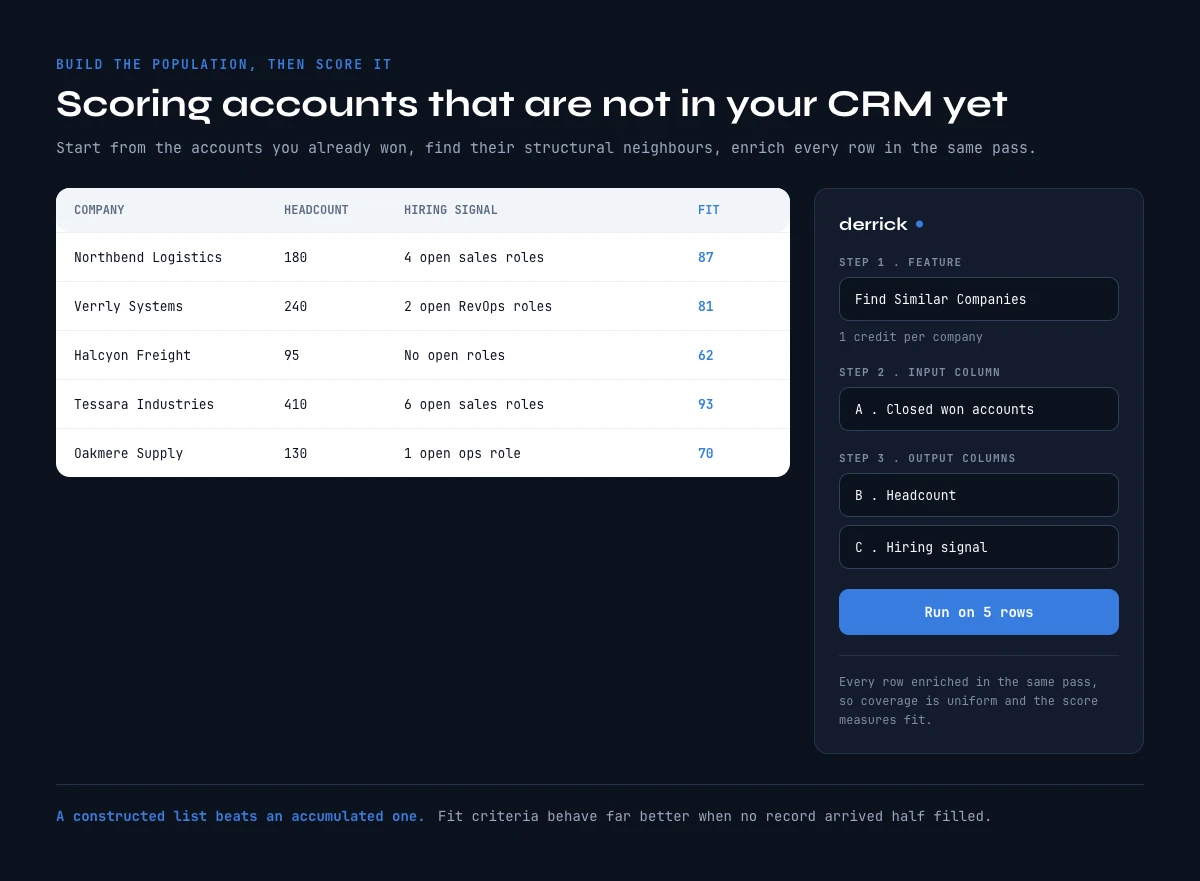
Scoring accounts that are not in your CRM yet
Every guide on this subject assumes the leads are already in the database. That assumption quietly excludes the most valuable population you have, which is the set of companies that fit perfectly and have never heard of you. Lead scoring software cannot rank a record that does not exist, so outbound teams end up scoring inbound and calling it pipeline prioritisation.
The fix is to build the population before you score it, which inverts the usual order. Start from the accounts you already won, find their structural neighbours, enrich the resulting list on the same fit fields your model weights, and you have a scored target list rather than a scored inbox. Find Similar Companies does the neighbour step at 1 credit per company, working from your best customers rather than from a filter you guessed.
The practical benefit is that fit criteria behave much better on a list you constructed than on one that accumulated. Coverage is uniform because you enriched every row in the same pass, so the score measures fit rather than measuring how completely each record happened to arrive. That is the cleanest scoring population most teams can build, and it is usually the one nobody builds.
Scoring accounts and buying committees. In B2B the unit that buys is rarely one lead. A deal usually involves several people, from the user who feels the problem to the person who signs, and scoring each contact in isolation spreads the signal thin: three mid-level leads at the same company can each look lukewarm while the account is plainly in market. Score the account first on fit and timing, then score how well you cover its buying committee: do you know the economic buyer, the champion and the main user, with a current title for each? Enrich Leads refreshes those titles at 1 credit per profile. An account with a strong score and an empty committee is a research task, not a routing decision.
After the score: routing, alerts and update speed
A score earns its keep in the minutes after it changes. Most of the value of lead scoring software is lost not in the model but in the hand-off, when a number moves and nothing happens.
Routing. Decide in advance what each band does: the top band goes to an owner within the hour, the middle band enters a nurture sequence, the bottom band waits. Write it as rules the CRM can execute, because a band that depends on a rep checking a view gets checked on Mondays.
Alerts. Alert on movement, not only on level. An account that jumps two bands in a week is a better reason to call than one that has sat in the top band for a quarter. Keep alerts rare enough that people still read them.
Update speed. Match the refresh to the criterion. Behavioural events can move the score in near real time, firmographics can wait for a quarterly pass, and intent signals need at least a weekly refresh to stay useful. A score that updates nightly is fine for fit and too slow for a demo request.
Undo. Let a falling score take a lead back out of a sequence or off a rep's list. Scores that only ever push leads forward fill the pipeline with records that were hot once.
How to prove your model actually works
Configuration guides are everywhere; verification guides are not. Here is how to find out whether your lead scoring software is ranking or just sorting, in one measurement you can run next quarter.
Freeze the score at hand-off, not at close. Store the score as it stood when the lead was routed. Reading the current score against a closed deal proves nothing, because the score kept moving while the deal progressed and will look prescient by construction.
Compare deciles, not averages. Bucket the frozen scores into ten bands and compute the conversion rate of each. A working model shows a monotonic slope from the bottom band to the top. An average conversion rate for "high scores" against "low scores" can look healthy while the middle is pure noise.
Name the KPIs on those ten bands. The same bands give you the numbers to report every quarter: the MQL to SQL conversion rate per band, the time from hand-off to first touch in the top band, the share of closed-won deals that started in the top three bands, and the precision of the top band, meaning the share of the leads it flagged that went on to convert. If the top band does not convert clearly better than the middle, the model is sorting, not ranking.
Keep a holdout. Route a small random sample by arrival order rather than by score, and compare. Without an unscored control you cannot separate the model's contribution from the effect of reps simply working a shorter list more carefully, and that effect is real.
Wait a full sales cycle before judging. Reading outcomes at four weeks on a cycle that runs three months measures speed of response, not quality of ranking. Set the window from your own median cycle length and resist reading it early.
If the slope is flat after an honest measurement, the answer is almost never to re-tune the weights. It is to go back to the fill rate on the fields those weights read, because a model cannot extract a signal from a column that is empty on half the rows.
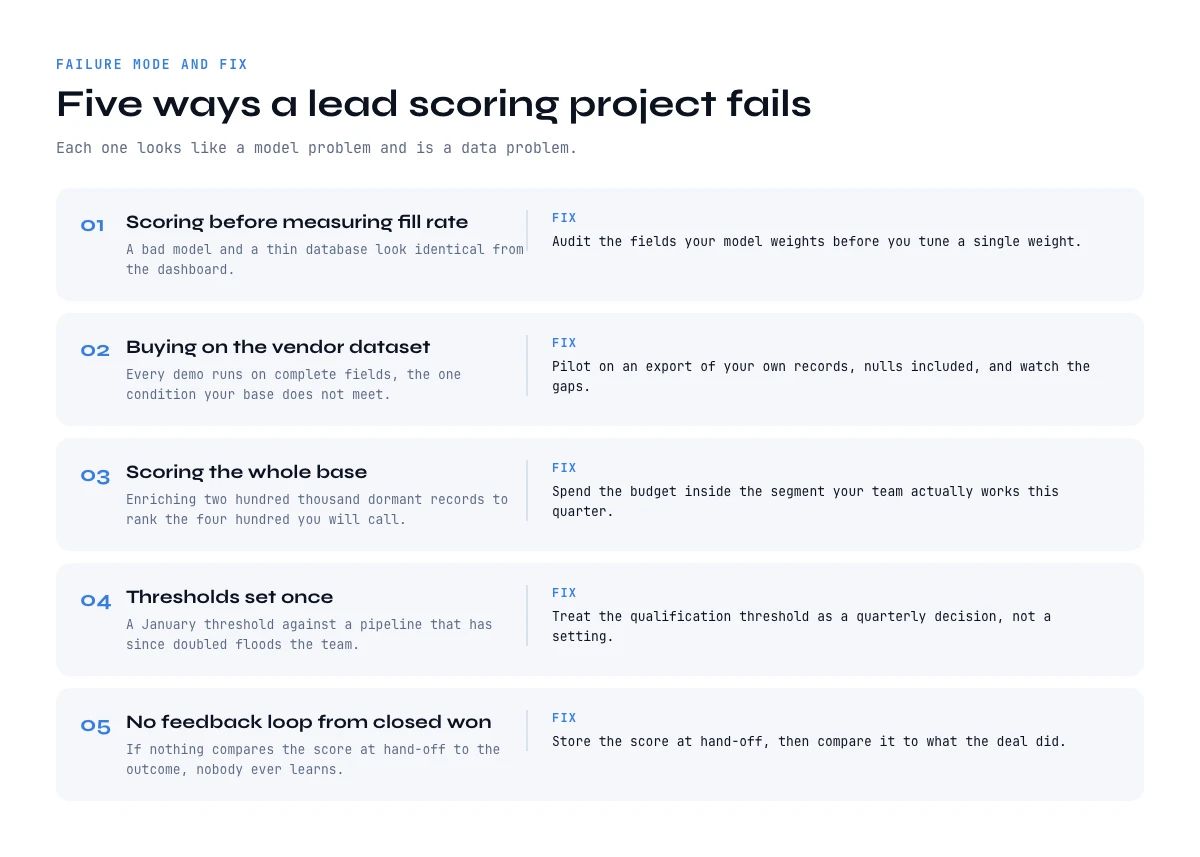
Five ways a lead scoring software project fails
Scoring before measuring fill rate. Lead scoring software will happily run on a database it has never audited, and our enrichment workflow guide covers how to fill the properties on a schedule instead. If you do not know what percentage of records carry the fields your model weights, you cannot distinguish a bad model from a thin database, and you will spend the next quarter tuning weights.
Buying on the vendor's dataset. Every demo runs on a database with complete fields, which is precisely the condition your own database does not meet. Ask to pilot on an export of your own records, nulls included, and watch what the tool does with the gaps, because that is the behaviour you are actually purchasing. Our CRM data quality report covers how to measure that starting state.
Scoring the whole base instead of the worked segment. Enriching and scoring two hundred thousand dormant records to rank the four hundred your team will actually call this quarter spends the budget where nobody looks. Scoring quality is a coverage problem inside the population you touch.
Thresholds set once. An MQL threshold picked in January against a pipeline that has since doubled sends a volume of leads nobody planned for. Thresholds are a quarterly decision.
No feedback loop from closed-won. If nothing compares the score at the time of hand-off to the eventual outcome, nobody ever learns whether the model works, and the honest answer after a year is that you still do not know.
Is your data ready to be scored?
Select every criterion type you can populate on most of your records today. The verdict tells you which half of the score is real and which is a default, not a mark out of ten.
Select the criteria you can populate on most records today.
Multi-select: click a criterion again to remove it. The verdict splits FIT (who they are) from TIMING (why now), because a score can be solid on one and entirely defaulted on the other.
Choosing lead scoring software: the short version
The right lead scoring software is rarely the one with the longest feature list. Most lead scoring tools help you judge your data; what decides the result is repairing it, field by field, before the first rule runs.
Pick your lead scoring software on three properties rather than on a feature count: it must express decay per criterion, it must let you see what a null did to a score, and it must accept fields written back on a schedule. Almost every serious tool in the category can rank; those three are where lead scoring software actually separates.
Then spend the first two weeks on the inputs rather than on the weights. Measure fill rate on the fields you intend to score, enrich the company layer first because it is the cheapest credit you will spend and it lifts every contact underneath it, add one dated signal so the ranking can answer why now, and normalise your titles before a single rule matches on them. A modest rule-based model on well-covered fields outperforms a sophisticated model on a sparse database, reliably, and it is the version your reps will still be using next quarter.
Frequently asked questions
What is lead scoring software?
What is the difference between rule-based and predictive lead scoring?
What data does lead scoring software need?
How do I choose lead scoring software?
Does lead scoring software integrate with my CRM?
How much does it cost to make a database scorable?
How do I know whether my lead scoring model actually works?
What is the best lead scoring software?
Keep reading
Continue exploring this cluster


CRM Enrichment: How to Enrich Your HubSpot or Salesforce Data (Complete Guide)
Read →

HubSpot Data Enrichment: How to Automate It With Workflows
Read →

CRM Data Quality Report 2026: Decay, Cost & the Enrichment Gap
Read →

CRM Data Strategy: The 5-Layer Playbook (2026)
Read →