
Data Enrichment API Pricing: How the Models and Costs Really Work
Data enrichment API pricing explained: per-record vs credit models, hidden costs, and how to estimate your real cost per usable record before you commit.


If you are shopping for a data enrichment API, the first thing you notice is how hard it is to compare prices. One vendor charges per record, another sells credits, a third hides everything behind a "book a demo" button. Data enrichment API pricing looks simple on a landing page and then quietly turns into a spreadsheet full of asterisks once you try to model real volume.
This guide breaks down how data enrichment API pricing actually works, the models you will run into, the costs that stay hidden until your first invoice, and how to estimate what your own volume will really cost. No sales call required, and no vendor math that only makes sense at 200 records per month.
You will also get actual numbers, which most pages on this topic skip: the full Derrick price grid in euros, what one company record, one email and one phone number cost at each tier, the price ranges other providers publish, and a calculator that turns any quote into a cost per usable record. Run your own numbers in the calculator in part 11.
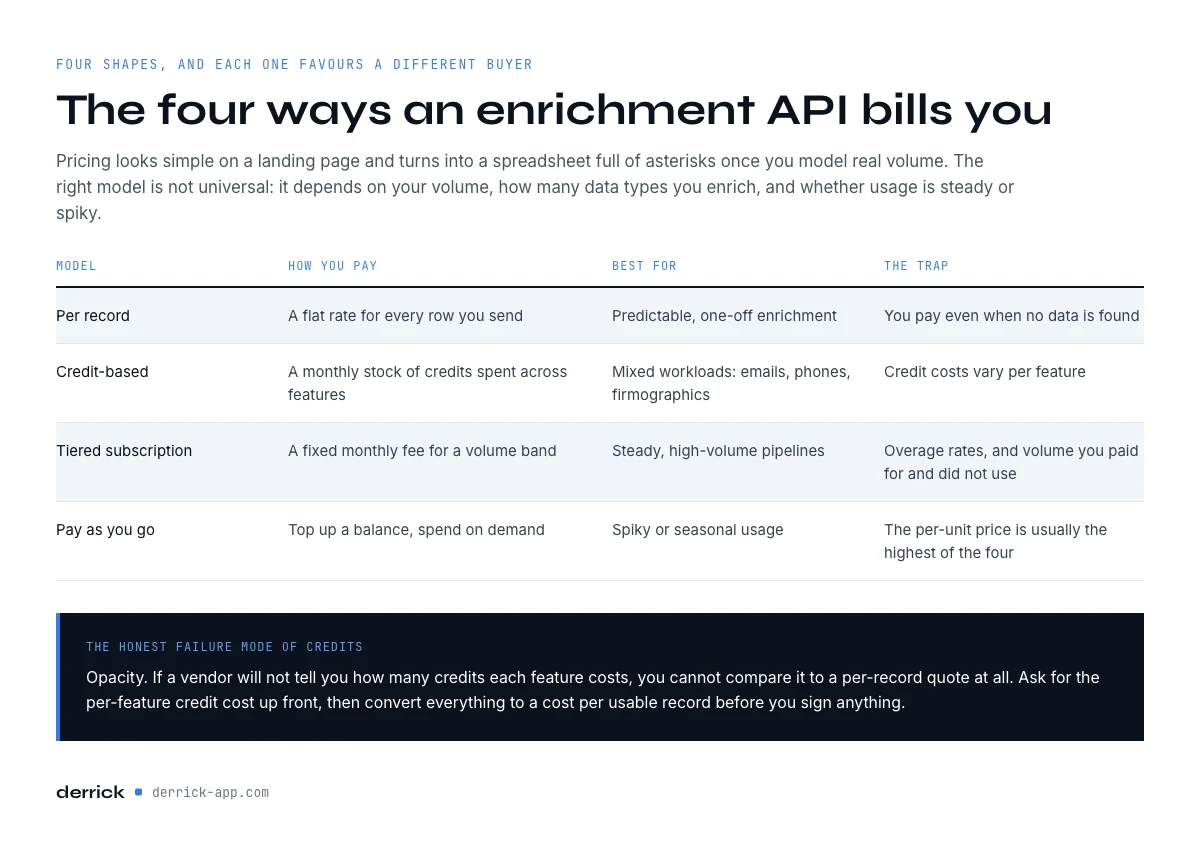
Data Enrichment API Pricing: The Quick Comparison
Here is the 30-second version before we go deeper. Most providers land in one of four pricing shapes, and each one favors a different kind of buyer.
| Model | How you pay | Best for | The trap |
|---|---|---|---|
| Per record | A flat rate for every row you send | Predictable, one-off enrichment | You pay even when no data is found |
| Credit-based | A monthly stock of credits spent across features | Mixed workloads (emails, phones, firmographics) | Credit costs vary per feature |
| Tiered subscription | Fixed monthly fee for a volume band | Steady, high-volume pipelines | Overage rates and wasted unused volume |
| Pay as you go | Top up a balance, spend on demand | Spiky or seasonal usage | Per-unit price is usually the highest |
The right model is not universal. It depends on your volume, how many data types you enrich, and whether your usage is steady or spiky. The rest of this page unpacks each one so you can read any pricing table without getting surprised later.
How Data Enrichment API Pricing Actually Works
Under the marketing, every data enrichment API bills you for one thing: a successful lookup against a data source. The differences come from how that lookup is packaged and metered.
Per-record pricing is the most transparent shape. You send a row (a domain, a name, a LinkedIn URL) and pay a fixed amount whether or not the provider returns anything. Contact-level enrichment typically sits around 0.01 to 0.10 dollars per record at self-serve volumes, and drops as you commit to larger annual contracts.
Credit-based pricing abstracts the record into a currency. You buy a monthly pool of credits and each feature consumes a set number: an email might cost more credits than a company lookup, an AI-generated field more than a raw firmographic. This model wins when you enrich several data types, because one balance covers all of them instead of forcing separate line items.
Tiered subscriptions bundle a volume band into a flat monthly fee. They reward steady, high-volume pipelines but punish two things: unused volume at the end of the month, and overage once you cross the band, which is often billed at a much higher unit rate than your plan implies.
Pay as you go keeps a balance you top up on demand. It fits spiky or seasonal usage where a monthly commitment would waste money, and the tradeoff is that the per-unit price is usually the highest of the four.
Per match vs per lookup. Two terms show up in almost every vendor FAQ, and they map straight onto the table above. Per lookup (also called per attempt or per call) means every row you send is billed, found or not: that is the per-record column. Per match, sometimes sold as pay on success, means you are billed only when the provider returns data. Credit-based plans can work either way, feature by feature, so ask which rule applies to each field before you compare two quotes. On Derrick, the Email Finder and the Phone Finder are per match, while a company enrichment is billed per record sent.
What Really Drives the Cost per Record
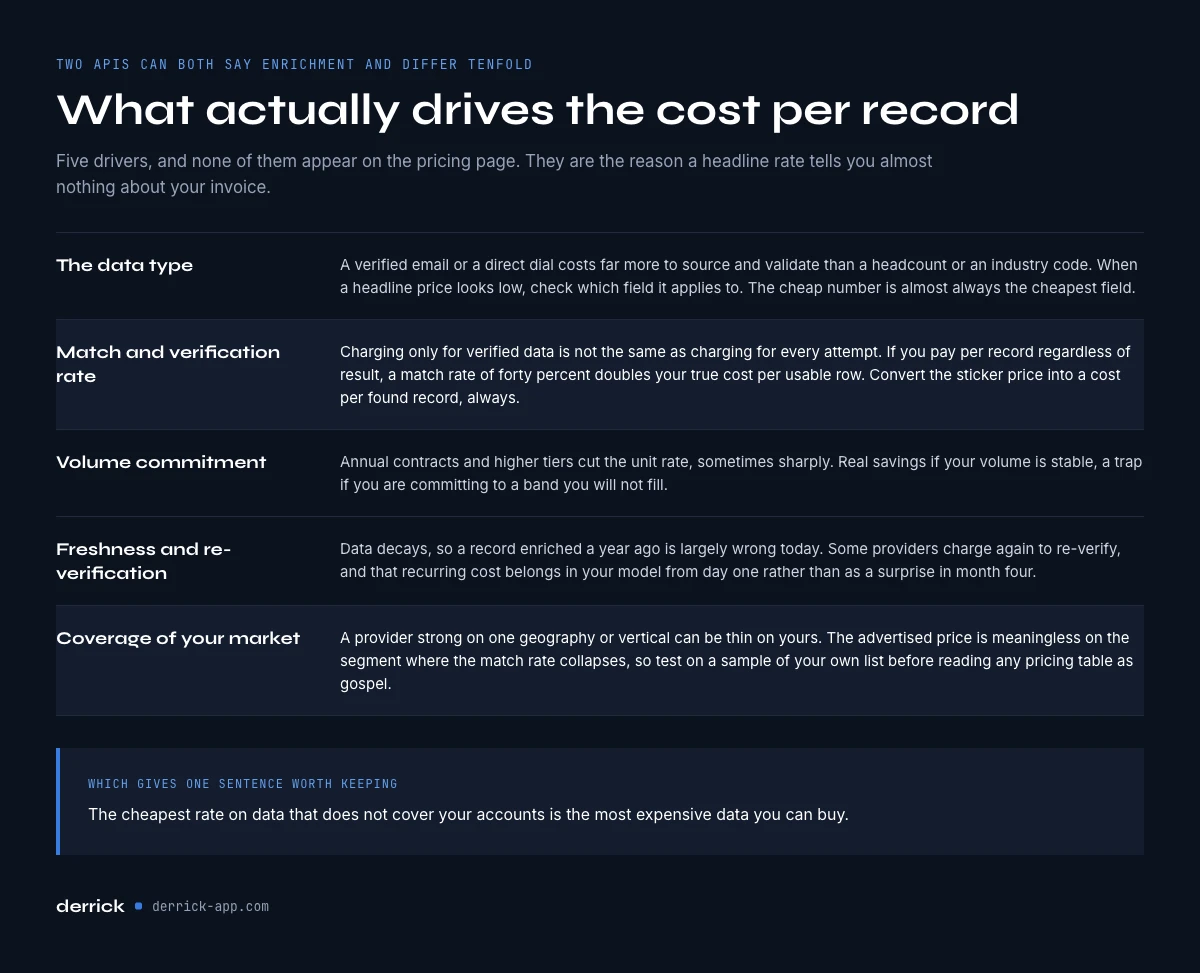
Two APIs can both advertise "enrichment" and differ 10x in price. The gap comes from a handful of cost drivers that rarely make the pricing page.
The data type. A verified email or a direct dial is far more expensive to source and validate than a company headcount or an industry code. When you see a low headline price, check which field it applies to. The cheap number is almost always the cheapest field. Company records are the cheap end of the grid, and what they really cost per usable row is worked through in our company data API breakdown.
Match and verification rate. A provider that charges only for verified data is not the same as one that charges for every attempt. If you pay per record regardless of result, a 40 percent match rate doubles your true cost per usable row. Always convert the sticker price into a cost per found record.
Accuracy is the second multiplier. Match rate tells you how many rows came back. Accuracy tells you how many of those are right: the email still delivers, the number still rings the right person, the headcount is current. The real cost per usable record is the unit price divided by match rate times accuracy. Take a provider that returns something for every row but gets only 70 percent of it right: each usable record costs 1 / 0.70, about 1.43 times the sticker. Add a 60 percent match rate on per-lookup billing and the multiplier climbs to about 2.4. No accuracy claim on a landing page replaces a test on a sample of your own list.
Volume commitment. Annual contracts and higher tiers cut the per-unit rate, sometimes dramatically. That is real savings if your volume is stable, and a trap if you are committing to a band you will not fill.
Freshness and re-verification. Data decays. B2B contact data is commonly said to go stale at something like 2 to 3 percent per month, an order of magnitude that varies a lot by segment, so a record you enriched a year ago is partly wrong today. Some providers charge again to re-verify, and that recurring cost belongs in your model from day one.
Coverage of your target market. A provider strong on US tech firmographics can be thin on European SMBs or a specific vertical. The advertised price is meaningless on the segment where the match rate collapses, so test the API on a sample of your list before you read any pricing table as gospel. The cheapest rate on data that does not cover your accounts is the most expensive data you can buy.
Credit-Based vs Per-Record: Which Model Wins
This is the decision most teams actually face, so it deserves a direct answer. Neither model is cheaper by nature; the winner depends on your mix.
If you enrich one data type at steady volume, per-record pricing is easiest to forecast and usually cheapest, because you are not paying for flexibility you do not use. A pure email-verification workflow is a good example.
If you enrich several data types with variable demand, credit-based pricing tends to win. One pool of credits flows to emails one week and firmographics the next, with no stranded budget in a plan you underused. It also makes internal chargeback simpler: one number, not five invoices.
The honest failure mode of credits is opacity. If a vendor will not tell you how many credits each feature costs, you cannot compare it to a per-record quote at all. The fix is to demand the per-feature credit cost up front and convert everything to a cost per usable record before you sign anything.
Through the Derrick API
One credit balance for the API and the app
Enrichment APIs are usually priced apart from the tool the team uses. With Derrick, API calls draw on the same credit balance as the work done in the web app or in Google Sheets, and the cost of each enrichment is published per feature.
- Feature
- Derrick API
- Credit cost
- Included
The first button opens the web app, where your account and key live. API and MCP access starts on the PLUS plan. The second details the surface.
Data Enrichment API Pricing Compared: What to Look For
When you line up quotes, ignore the headline number and score each provider on the fields below. This is the checklist that turns a confusing pricing page into an apples-to-apples comparison.
- Is the price public, or quote only? If you can see and estimate the cost without a sales call, evaluation is fast. Several of the largest data providers publish no price at all and quote every buyer separately. A quote-only price is not automatically higher, but you cannot compare it until you have the per-unit rate at your volume in writing, so ask for it in the first call. Hidden pricing often signals a rate set by how much they think you will pay.
- Do you pay for misses? Per-attempt billing inflates your real cost. Pay-per-result is the friendlier model when match rates are uncertain.
- What is the true floor? Ask for the lowest per-unit rate at your committed volume, not the list price. That number is your real cost.
- Are credits rolled over? Rollover protects you from paying for unused volume. No rollover means every slow month is money burned. On Derrick, unused credits roll over and never expire while you stay on a paid plan; they expire if the account goes back to the free plan.
- How is the API metered? Rate limits, batch endpoints, and webhook delivery all affect throughput, which affects how quickly you can spend, and how much engineering the integration costs. Our guide to API rate limits and the architecture breakdown cover this in detail.
Hidden Costs That Wreck an Enrichment Budget
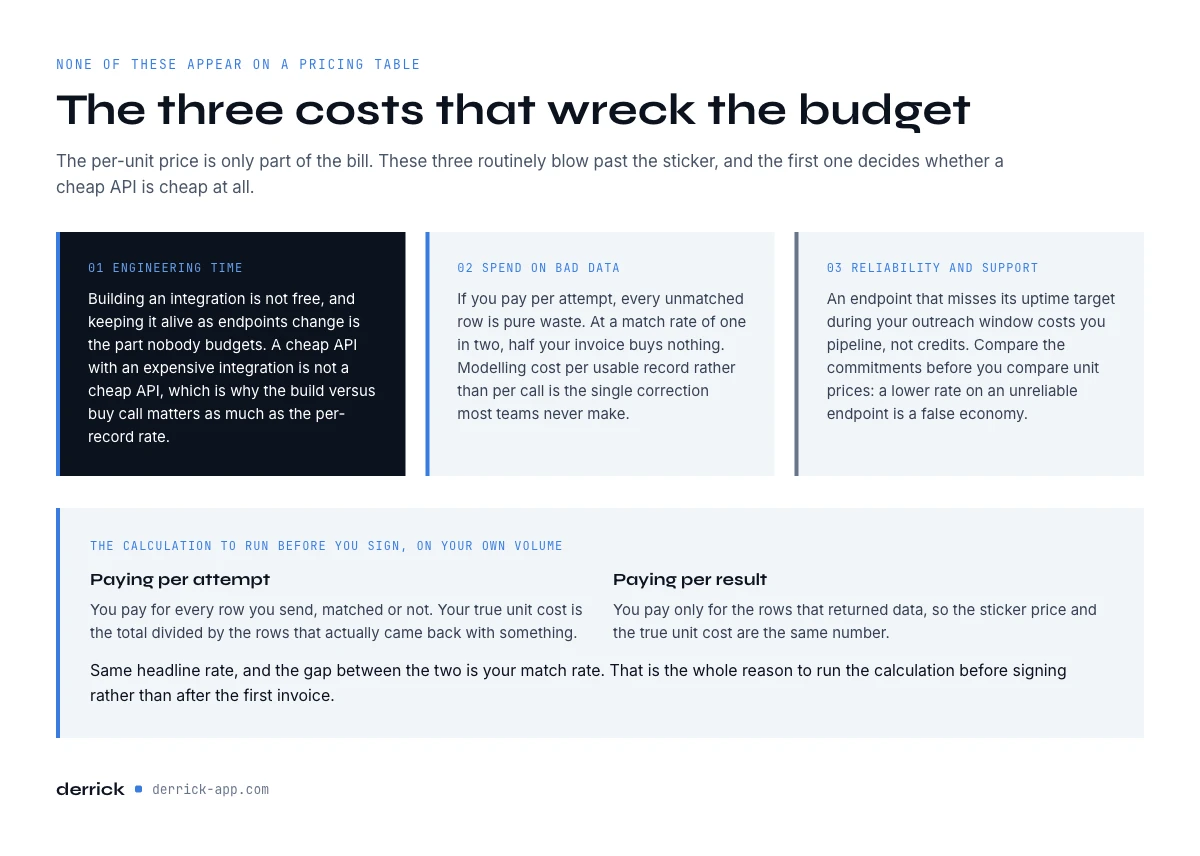
The per-unit price is only part of the bill. Three costs routinely blow past the sticker, and none of them appear on a pricing table.
Engineering time. Building and maintaining an integration is not free. A single API integration can take weeks to months of developer time to build and keep alive as endpoints change, which is why the build vs buy decision matters as much as the per-record rate. A cheap API with an expensive integration is not cheap.
Wasted spend on bad data. If you pay per attempt, every unmatched or unverified row is pure waste. At a 50 percent match rate, half your invoice buys nothing. Modeling cost per usable record, not per call, is the single most important correction most teams miss.
Reliability and support. An API that misses its uptime target during your outreach window costs you pipeline, not just credits. Compare the SLA commitments before you compare unit prices, because a lower rate on an unreliable endpoint is a false economy.
What the Market Charges: Data Enrichment API Pricing by Data Type
Comparing providers by name is not the point of this page, and their grids change every quarter anyway. What helps is knowing the ranges other companies publish, so you can tell whether a quote is in the normal band or an outlier. The figures below are approximate, rounded, taken from public self-serve price pages and observed on 2026-10-14. They are in dollars because that is how they are published; we do not convert them, since any exchange rate we picked would add a guess on top of an estimate.
| What you buy | Typical published price (approx., observed 2026-10-14) | What to check |
|---|---|---|
| Entry self-serve plan | About 10 to 100 dollars per month | Whether the API is included at that tier |
| One credit on a public API grid | About 0.0065 dollars at entry, down to about 0.001 at the largest tier | How many credits each field costs |
| One company record | About 0.01 dollars | Which fields the record actually contains |
| One email | About 0.12 dollars | Billed per found or per attempt, and verified or not |
| One phone number | About 0.62 dollars | Direct line or switchboard, billed only when found or not |
| Largest providers | Price on request | The per-unit rate at your committed volume |
Two readings matter. First, the spread between data types is huge: a phone number commonly costs fifty times a company record, so a blended "price per record" means nothing until you know your mix. Second, the entry plan price says little about the API. Some providers include REST access from the first paid tier, others keep it for higher tiers, and that single line can double what the API really costs you. Email and phone rows are where most of the budget goes, which is why the contact enrichment API guide goes into how those two fields are sourced and checked.
What a free tier really gives you
Free tiers on public enrichment APIs commonly sit somewhere between about 20 and 100 credits a month (observed 2026-10-14), often with a low rate limit. That is enough to test the shape of the response and your match rate on a small sample, never enough to run production. Watch two things: whether the free tier includes API access at all, and whether the fields you need, usually email and phone, are part of it.
On Derrick, the free plan is 100 credits a month with no card. You can spend them in the web app and in Google Sheets on company and profile enrichment, which is the right way to measure your match rate on your own accounts before you pay. The Email Finder and the Phone Finder are paid features, so emails and phones are tested from Standard (20 euros per month), and the API itself opens on Plus.
How Derrick Approaches Data Enrichment API Pricing
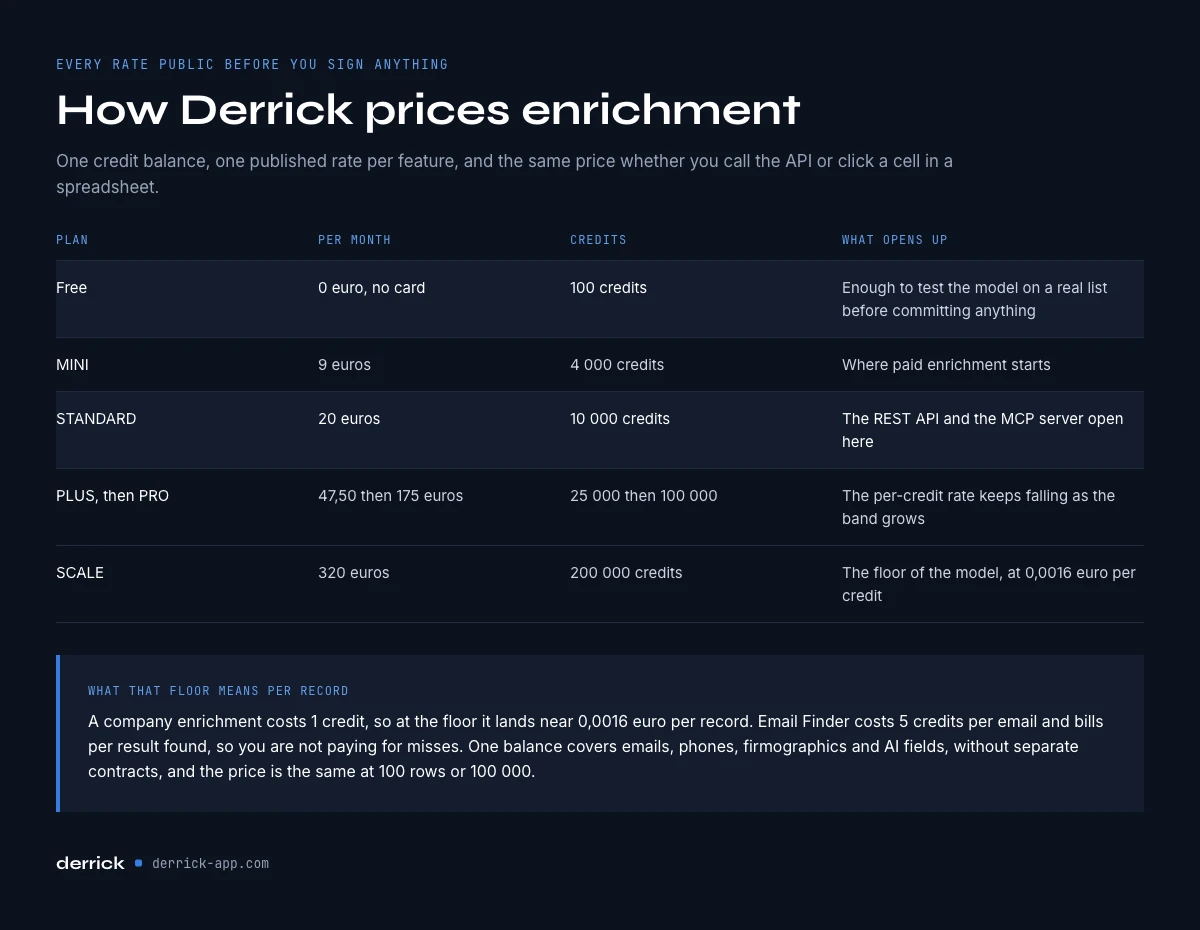
Derrick prices enrichment on a transparent credit model, and every rate is public before you sign anything. The free plan gives you 100 credits per month at no cost and no card. The first paid plan, Standard, is 20 euros per month, and the REST API and the MCP server open on the Plus plan, 47.50 euros per month for 25,000 credits. The per-credit cost falls as you scale, down to a floor of 0.0016 euros per credit on the SCALE plan.
That floor is what makes the model easy to reason about. A company enrichment costs 1 credit, so at scale it lands near 0.0016 euros per record. The Email Finder costs 5 credits per email and bills per result found, so you are not paying for misses. Because it is one credit balance, the same budget flows across emails, phones, firmographics, and AI fields without separate contracts.
For teams that want programmatic access, the Derrick enrichment API (REST, an x-api-key header, 60 requests per minute) and the Derrick MCP expose the same enrichment to back-ends, scripts and agents from 47.50 euros per month (Plus plan), on the same credit pricing and with the same key. And for anyone who does not want to touch an API at all, Derrick runs in its web app and from a Google Sheets sidebar, so a whole list enriches without a line of code. The credit cost per feature is identical whether you call the API or run a list in the app; API access itself needs Plus or above.
What matters is that the price is public, self-serve, and the same at 100 rows or 100,000, so your budget does not spring a surprise when you grow.
Derrick Plans and API Access, Tier by Tier
Here is the whole grid, with the one column most pricing pages leave out: whether the API is included. Every plan uses the same credits and the same per-feature costs. What changes is the monthly stock, the price per credit, and the surfaces you can use.
| Plan | Price per month | Credits per month | Cost per credit | REST API and MCP |
|---|---|---|---|---|
| Free | 0 euros | 100 | Free | No (web app and Google Sheets) |
| Standard | 20 euros | 10,000 | 0.002 euros | No |
| Plus | 47.50 euros | 25,000 | 0.0019 euros | Yes |
| Pro | 175 euros | 100,000 | 0.00175 euros | Yes |
| Scale | 320 euros | 200,000 | 0.0016 euros | Yes |
So the entry price of the tool and the entry price of the API are two different numbers. If you only need to enrich lists, Standard covers emails and phones in the web app and in Sheets. If enrichment has to run inside your product, your CRM sync or a scheduled job, Plus is the floor, and the same key serves the REST API and the MCP server. Credits roll over on every paid plan and never expire while you stay on one. The full plan details list what else each tier adds.
What One Data Point Costs: Company, Email, Phone
A price per credit only becomes useful once you know what a credit buys. On Derrick, each field has a fixed credit cost, and the two finders are billed only when they find something. Multiply one by the other and you get the cost of a single data point at each tier, rounded below.
| Data point | Credits | On Plus (0.0019 euros per credit) | On Scale (0.0016 euros per credit) |
|---|---|---|---|
| Company record (Enrich Companies) | 1 per company | About 0.0019 euros | About 0.0016 euros |
| Found email (Email Finder) | 5 per email found | About 0.0095 euros | About 0.008 euros |
| Found phone number (Phone Finder) | 200 per number found | About 0.38 euros | About 0.32 euros |
For the finders, a row where nothing is found costs nothing, so your match rate changes how many data points you get, not what each one costs. That is the per match logic from part 2, applied field by field. The company enrichment is billed per record sent, at 1 credit, which is why it is the cheap end of any enrichment budget. The email found by the Email Finder already comes verified, so you do not add a separate verification pass on top.
The phone line is where budgets move. At 200 credits per found number, 1,000 phones on Plus take about 200,000 credits, far more than a Plus month holds, so a phone-heavy workload belongs on Pro or Scale. The free plan's 100 credits cannot cover a single phone. Run the same arithmetic on your own mix before you choose a tier: count how many companies, emails and phones you will really use each month, not how many rows you have.
Estimating Your Own Enrichment Costs
Before you commit to any provider, model your real spend in five steps.
- Count the contacts you will really use. Not the size of your database: the accounts and people you will reach out to or score each quarter.
- List the fields you need. Company data, email, phone. Each one has its own price, and phones usually dominate the bill.
- Test the match on 100 rows of your own list. On Derrick, company and profile enrichment can be tested in the free web app plan; emails and phones are tested from Standard.
- Apply the formula. Usable records = rows sent x match rate x accuracy. Bill = rows sent x price if you pay per lookup, or matched rows x price if you pay per match.
- Add a refresh budget. Plan a re-verification pass on your active records every quarter, because data decays.
The math behind step 4 is short: take your monthly volume, multiply by your expected match rate to get usable records, then multiply the per-unit rate by total attempts (not usable records) if you pay per call, or by usable records if you pay per result.
A worked example: 10,000 rows per month at a 60 percent match rate is 6,000 usable records. On a pay-per-attempt API at 0.05 dollars, you pay for all 10,000 attempts, so 500 dollars for 6,000 usable rows, or about 0.083 dollars each. On a pay-per-result model at the same headline rate, you pay only for the 6,000, so 300 dollars. Same sticker, 40 percent difference in true cost. That gap is the whole reason to run this calculation before signing.
Now add accuracy. If 90 percent of those 6,000 matched rows are correct, you have 5,400 usable records, and the per-lookup bill works out to about 0.093 dollars each. Put your own quote in the calculator below and switch between the two billing modes.
Cost per usable record calculator
Type any quote, in any currency. The calculator applies match rate and accuracy, and shows the same quote under per lookup and per match billing. It runs in your browser and calls no API.
Fill in the fields to see your cost per usable record.
Usable records = rows x match rate x accuracy. Per lookup bills every row sent; per match bills only the rows that return data, right or wrong. For reference, a found email on Derrick costs 5 credits, about 0.0095 euros on the Plus plan (5 x 0.0019 euros); the Email Finder is a paid feature, available from Standard.
Do the same exercise for freshness: if a few percent of your data decays monthly, budget a re-verification pass on your active records every quarter so your CRM does not quietly fill with dead contacts.
Prices in this market move every quarter. If you want the next enrichment API guide and the updated numbers when they change, the Derrick newsletter sends one edition every 2 weeks.
Choosing the Right API for Your Budget
Pick the pricing model that matches your usage, not the lowest headline. Steady single-type volume favors per-record. A mixed, variable workload favors credits with rollover. Spiky demand favors pay as you go. And whatever you choose, convert every quote to a cost per usable record and add the integration and freshness costs before you compare. A provider that lets you test on a real sample and see the rate without a sales call has already earned a head start, because you can verify the price against your own accounts instead of trusting a table.
If you want to skip the integration cost entirely while keeping transparent pricing, start with the free plan, enrich a real list in the web app or from a Google Sheet, and only scale when the numbers hold. The 2026 data enrichment API report has the wider benchmark if you want to see where the market sits.
Frequently asked questions
How much does a data enrichment API cost?
What is the difference between per-record and credit-based pricing?
Do I pay when no data is found?
Why is data enrichment API pricing so hard to compare?
How can I reduce my data enrichment costs?
What hidden costs should I budget for?
Is there a free data enrichment API?
Which plan do I need for the Derrick API?
Keep reading
Continue exploring this cluster


The 2026 State of Data Enrichment APIs: Market, Architecture & Reliability Benchmark
Read →

Data Enrichment API: Architecture and How It Works
Read →

Webhooks and Data Enrichment: How to Trigger Enrichment from Events
Read →

API Rate Limits and Quota Management: Everything You Need to Know
Read →