Free email extractor
Paste a block of text, a page's HTML source or a CSV export, or drop a file: the email extractor pulls out every address, removes duplicates, sorts them into named, generic, webmail and disposable, and exports a clean CSV.
Extract email addresses from text
Paste any text, HTML source or export, or drop a .txt / .csv file. Everything runs in your browser: nothing is uploaded, nothing is stored.
Paste some text or drop a file, then click Extract emails.
Runs in your browser. The text and the file never leave your computer. Free, no signup.

At scale
derrick •
When the addresses are on hundreds of websites
In the Derrick web app, put your domains in a column and Email & Social Extractor from Website returns the published addresses and social profiles of each site, at 2 credits per line; Email Verification then checks each address at 1 credit. Both are paid features, available from the Standard plan (€20 per month). The free plan gives 100 credits a month to discover the app.
- Web app: nothing to install, no credit card
- Free plan: 100 credits every month
- API and MCP from the Plus plan (€47.50/month)
Install the add-on and enrich your lists without leaving your spreadsheet.
Install in Google Sheets →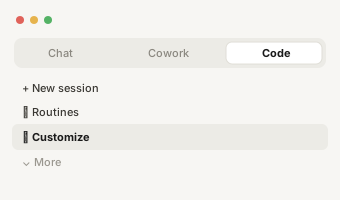
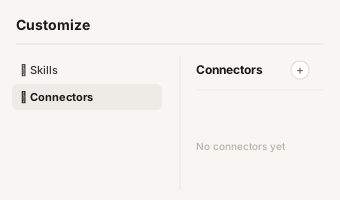
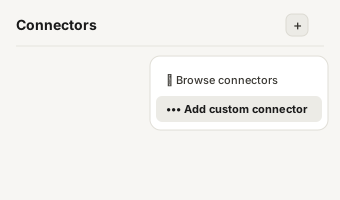
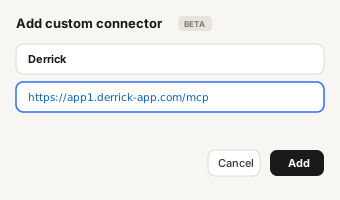
https://app1.derrick-app.com/mcp Call the same enrichment endpoints straight from your own stack or workflow.
Read the API docs →
How this email extractor wor
How this email extractor works
An email extractor reads a piece of text and keeps every string that has the shape of an email address. This one works on what you paste or drop: a block of copied text, the source code of a web page, an email thread, a CSV or TXT export from another tool. It does not visit websites and it does not send anything anywhere: the reading happens in your browser.
Four things happen when you click the button:
- Extraction. Every address is found, including those inside mailto: links, those written with HTML entities (@ instead of @) and the common bracket disguises such as name [at] company [dot] com or name (at) company (dot) com.
- Cleaning. Strings that look like addresses but are file names, such as logo@2x.png on retina images, are ignored and counted separately. Trailing dots picked up from the end of a sentence are removed.
- Deduplication. The same address written twice, or once in capitals and once in lowercase, is kept once. You can turn this off if you need to count occurrences.
- Sorting. Each address is labelled named (business domain), generic (info@, contact@, sales@...), personal webmail (gmail.com, outlook.com...) or disposable (throwaway inbox domains).
You can then copy the list or download it as a CSV with three columns: email, domain, type. Everything stays on your computer.

Email extractor or email scr
Email extractor or email scraper: which one you need
The two words are often used for the same thing, but the job is not the same. An email extractor works on text you already have. An email scraper goes to fetch that text first: it visits web pages, reads them, then extracts. If you have the page open, copy its text or its source here and you are done. If you have a list of two hundred company websites, opening each one by hand is the slow part, and that is where a scraper earns its keep.
Our guide to what an email scraper actually returns covers the second case in detail: the sources it pulls from, why scraped lists bounce, and the cleanup that makes them sendable.

Why an address you can see i
Why an address you can see is not extracted
When the tool finds nothing in text where you can read an address, the cause is almost always one of these:
- The address is an image. Some sites publish their contact address as a picture precisely so it cannot be copied. There is no text to read.
- The address is assembled by JavaScript. The page shows it, but the source code holds only fragments. Copy the visible text of the page (select all, copy) rather than its source.
- The address is behind a form or a login. A contact form has no address in the page at all, and a member directory shows addresses only once you are signed in.
- The disguise is unusual. The tool decodes the bracket forms and HTML entities. A sentence like "write to jane at the company domain" is meant for humans and stays that way.

What to do with the four typ
What to do with the four types of address
- Named, business domain. The address of a person at a company. This is what you want for a first sales contact. Check that the domain is really the company's and not a partner's or an agency's that happened to be on the page.
- Generic or role inbox. info@, contact@, sales@, support@. Real addresses, read by whoever sorts the mail. Useful for a small company or an administrative request, weak for reaching a decision maker. Keep them in a separate list and never mix them into your reply rate.
- Personal webmail. A gmail.com or outlook.com address can be a freelancer or a founder, or a personal address that is not tied to the company. Handle it differently from a business address.
- Disposable domain. A throwaway inbox. In a prospect list it does not belong; in a signup list it tells you the person did not want to leave a real address.

Before you send to an extrac
Before you send to an extracted list
An extracted address is a published address, not a verified one. Pages age, people leave, and some domains accept every address so a test looks positive whatever you send. Three habits keep a list clean:
- Test a doubtful address with our free email address checker: format, typo on a common domain, disposable or generic address.
- For a whole list, verify every address with a mail server check before the first send, and treat catch-all domains as unconfirmed. The email bounce checker guide explains the statuses you get back.
- Tag each address with where you found it. When you measure bounces per source after the first send, the difference between a fresh team page and an old PDF is usually obvious.
Who uses an email extractor
Who uses an email extractor
- Sales and business development teams who copied a conference attendee page, a partner directory or a long email thread and want the addresses in a column.
- Marketers cleaning an export from a form tool or an old CRM, where addresses sit inside notes and free text fields.
- Recruiters pulling contacts out of a list of applications or a forwarded thread.
- Operations and support teams who need the addresses from a log, a ticket export or a mailbox export, without writing a script.
For a few hundred lines of text, this page is enough. When the addresses you need are spread across hundreds of websites, or when you need the person rather than the published inbox, the job changes, and so does the tool.