
Best LinkedIn Email Finder 2026: 12 Tools Compared by Category and Cost
Find the best LinkedIn email finder for your list: 12 tools and every LinkedIn email extractor type compared on cost per email found. Test it on your rows.


The best LinkedIn email finder is the one that matches where your list lives: a web app or Google Sheets tool when you start from a list of LinkedIn URLs, a Chrome extension when you export Sales Navigator searches, an API when emails must land in a CRM without anyone clicking. Derrick covers the list and the API cases from one credit pool, with its web app as the main entry.
Most LinkedIn email finder reviews stop at "this tool exists, here is its pricing page". The question a real SDR or recruiter actually asks is narrower: which tool returns an email when I paste a LinkedIn URL, how often does it hit, and what does it cost to run 1,000 of those queries a month. This comparison answers those three questions for the 12 LinkedIn email finder tools that actually ship credit-based or subscription-based access in 2026.
The vendors split into five categories. On the same list of LinkedIn URLs, results and prices differ a lot from one tool to the next, and no public benchmark measures all twelve on the same rows. So this guide does two things: it sorts the tools by how they work, and it gives you a method to measure the hit rate on your own sample. Picking the right category before picking the vendor is the move that actually compresses the cost per verified email.
Chapter 1: The five categories of LinkedIn email finders
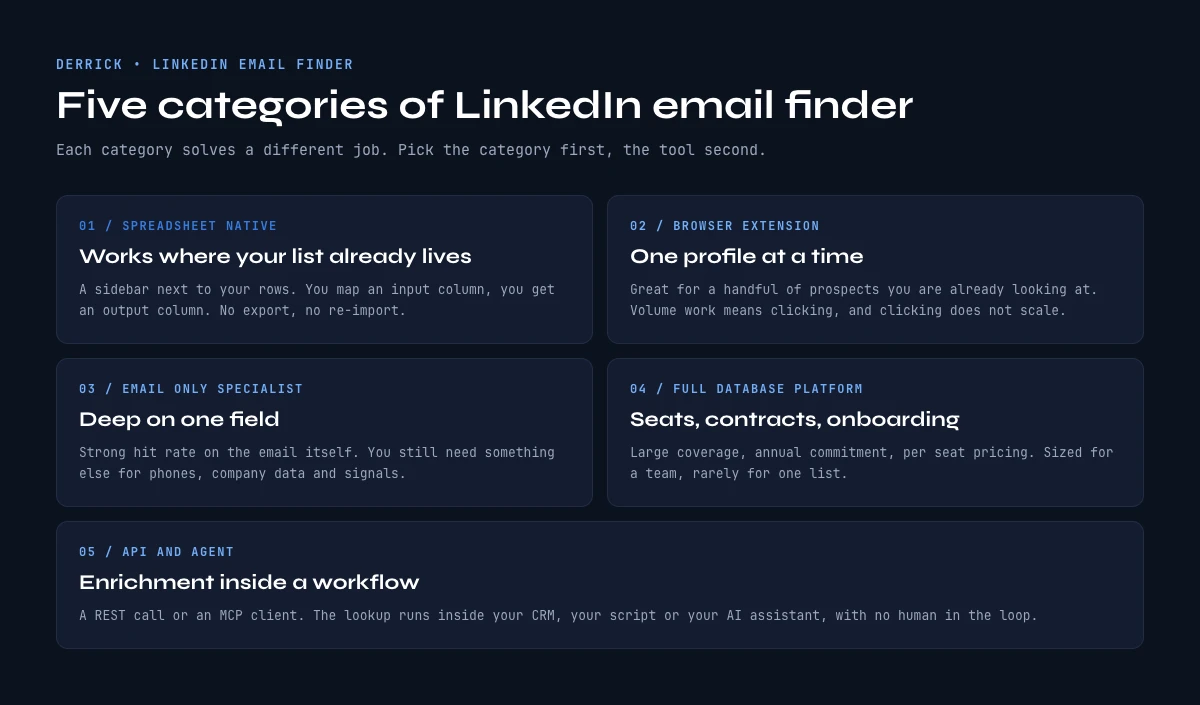
The vendors do not all do the same thing, and that is the first source of confusion when teams compare them on a flat features table. Five categories cover the market in 2026.
Category 1: List tools (web app or Google Sheets). A web app, or a sidebar installed from the Google Workspace Marketplace, that takes a column of LinkedIn URLs and writes emails back into the next column. The lookup runs server-side on the vendor's infrastructure, with no CSV round-trip. Some tools in this category still read the LinkedIn profile through your own session: Derrick does, through its Chrome extension (details in the account safety chapter). Best for SDRs and recruiters who work from a list. Vendors: Derrick (web app and Sheets), Surfe (formerly Leadjet), Apollo for Sheets, Wiza Sheets.
Category 2: Chrome extensions running on LinkedIn pages. An extension that sits on the open LinkedIn or Sales Navigator tab, reveals the email next to each profile, and exports a CSV. The strength is depth on Sales Navigator searches (200-2,500 profiles in one export). The cost is the LinkedIn account exposure, since the extension runs in the live session. This is the shape most people mean when they search for a LinkedIn email extractor. Vendors: Wiza, Evaboot, ContactOut, GetProspect, Hunter LinkedIn extension, Apollo Chrome.
Category 3: B2B email finder APIs. A REST endpoint that takes a LinkedIn URL or a name+company pair and returns an email plus a verification flag. The integration target is the team's CRM, ATS, or no-code pipeline. Vendors with public APIs: Hunter, Snov, Findymail, RocketReach, AnyMail Finder, Apollo, Derrick.
Category 4: Dedicated email-only tools. Vendors whose entire product is the email layer, not a broader sales intelligence platform. Smaller catalog, often a sharper hit rate on the specific email finder query, less context on the contact otherwise. Vendors: Hunter, Findymail, AnyMail Finder, Mailmeteor (when used as a finder).
Category 5: Sales intelligence platforms with email as one feature. Apollo, Lusha, ZoomInfo, Cognism. The email finder is one of many things the platform does, the seat price reflects the broader feature set, and the per-email cost ends up higher than category 4 unless the team also uses the CRM, intent data, and sequences.
The cleanest path for a team that works from a list is the list category, in a web app or in Google Sheets, which is why this guide spends more time on it than the others. For a single lookup from one profile URL, the LinkedIn email finder walkthrough goes step by step. The broader picture across all the LinkedIn extraction shapes lives in the 2026 LinkedIn data extraction guide.
Chapter 2: The 12 best LinkedIn email finders at a glance
A side-by-side reference of the 12 vendors that ship LinkedIn email finder access in 2026. Prices are the entry tier on monthly billing as shown on each vendor's public pricing page, checked on 13 October 2026. Where the page did not display amounts that day, the May 2026 figure is kept and marked as such. There is no hit-rate column on purpose: no source measures these twelve tools on the same rows, so the only hit rate worth reading is the one you measure yourself (method further down).
| Vendor | Category | Entry plan | Monthly credits | Free tier |
|---|---|---|---|---|
| Derrick | Web app + Sheets; API and MCP from PLUS (€47.50/mo) | €20/mo (STANDARD) | 10,000 credits | 100 credits/month; Email Finder needs a paid plan (from STANDARD, €20/mo) |
| Hunter | Email-only + extension + API | €49/mo | 2,000 credits | 50 credits/month |
| Wiza | Extension + Sheets | $49/mo | 100 emails | 20 emails/month |
| Apollo | Platform + Sheets + extension | $49/mo (May 2026) | 3,000 export credits (May 2026) | Free plan available |
| Mailmeteor (finder) | Free finder tool + Gmail mail merge | No paid finder plan listed | n/a | Free tool |
| Snov | Email-only + extension + API | $39/mo | 1,000 credits | 50 credits/month |
| GetProspect | Extension + API | $49/mo (May 2026) | 1,000 emails (May 2026) | 50 emails one-time (May 2026) |
| RocketReach | Platform + extension + API | $80/mo (May 2026) | 1,500 lookups (May 2026) | 5 lookups/month (May 2026) |
| ContactOut | Extension + API | $99/mo (May 2026) | 6,000 emails, annual (May 2026) | 40 emails one-time (May 2026) |
| Findymail | Email-only + Sheets + API | $99/mo | 5,000 finder credits | 10 credits to test |
| Lusha | Platform + extension + API | $49.90/mo | 400 credits | 40 credits/month |
| AnyMail Finder | Email-only + API | €26/mo | 400 credits | 100 credits at signup |
A note on hit rates. The same vendor returns a very different hit rate depending on the LinkedIn URL set fed into it. B2B URLs in the US and Western Europe at established companies come back far more often than SMB founders, freelancers, APAC contacts or very early-stage companies, at every vendor. The honest way to compare two vendors is to run the same sample through both and measure.
How a LinkedIn email finder actually finds an email
A finder of this kind does not read the email address on LinkedIn. Almost no profile shows one, and the tools that work from a profile URL use it as a starting point, not as the source of the address. The lookup happens in three steps.
- Identify the person and the company. From the profile URL, the tool gets a first name, a last name and the current employer. Some tools read the profile through your own LinkedIn session, others rely on a database built earlier.
- Find the company domain and its naming pattern. Most companies use a handful of formats, such as first.last, f.last or first. The tool resolves the domain of the employer, then works out which pattern that domain uses.
- Verify before returning. The candidate address is checked against the mail server. A serious finder only bills, or only returns as found, the addresses that pass this check.
That is why two tools fed the same URL can disagree: they may not resolve the same employer, they may not know the same pattern for that domain, and they may not apply the same verification threshold. It is also why a private or incomplete profile is not a dead end. As long as a name and a current company are known, the pattern and the verification still work.
At Derrick, the profile step is Enrich Leads (1 credit per profile, through your connected LinkedIn session) and the address step is the Email Finder, a multi-source lookup that returns verified emails and costs 5 credits only when an address is found.
Valid, risky, catch-all: what the status means and what you pay for
Every email finder returns more than an address: it returns a status, and the status decides whether the address is safe to send to. The three you will meet everywhere:
- Valid. The mail server confirmed that this mailbox exists. This is the address you can put in a sequence.
- Risky or unknown. The server did not give a clear answer. The address may exist, or the server may simply refuse to tell. Sending to a batch of these raises your bounce rate.
- Catch-all. The domain accepts every address, real or not, so a check cannot tell a real mailbox from a guess. A catch-all domain is common at small companies and needs its own handling.
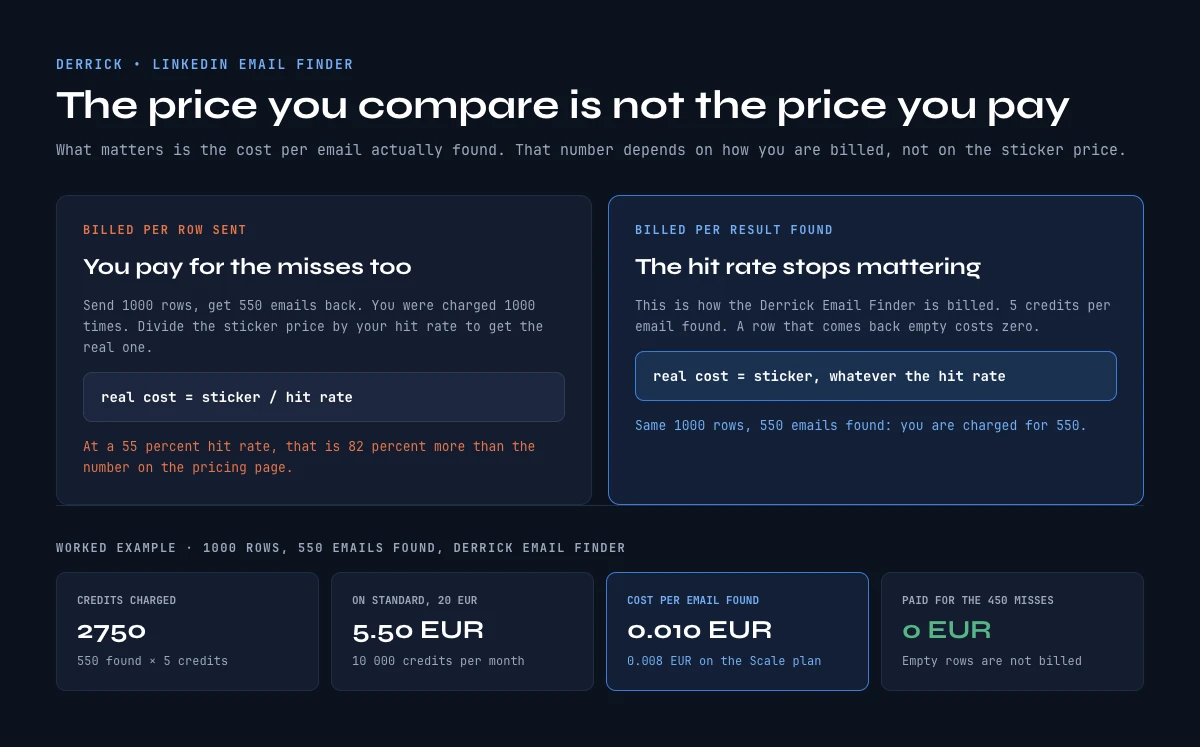
The billing question follows from this. Some vendors charge a credit per search, whatever comes back. Others charge only when an address is found. When you compare prices, compare the cost per valid email, not the cost per search. Derrick bills its Email Finder per result found (5 credits per email), so a row with no result costs nothing, and a separate Email Verification feature (1 credit per email) is there for addresses you already hold.
In the web app or Google Sheets
Compare on hit rate, measured on your rows
The three axes in this comparison end at the same question: how many addresses came back. Derrick bills per address returned, so a test on your own sample gives you the hit rate and its cost in the same run.
- Feature
- Lead Email Finder
- Credit cost
- 5 credits per email found
The first button opens the web app (nothing to install): 5 credits per email found, available from the STANDARD plan. The second details the feature and its cost per plan.
Chapter 3: Derrick (web app + native Sheets + extension + API + MCP)
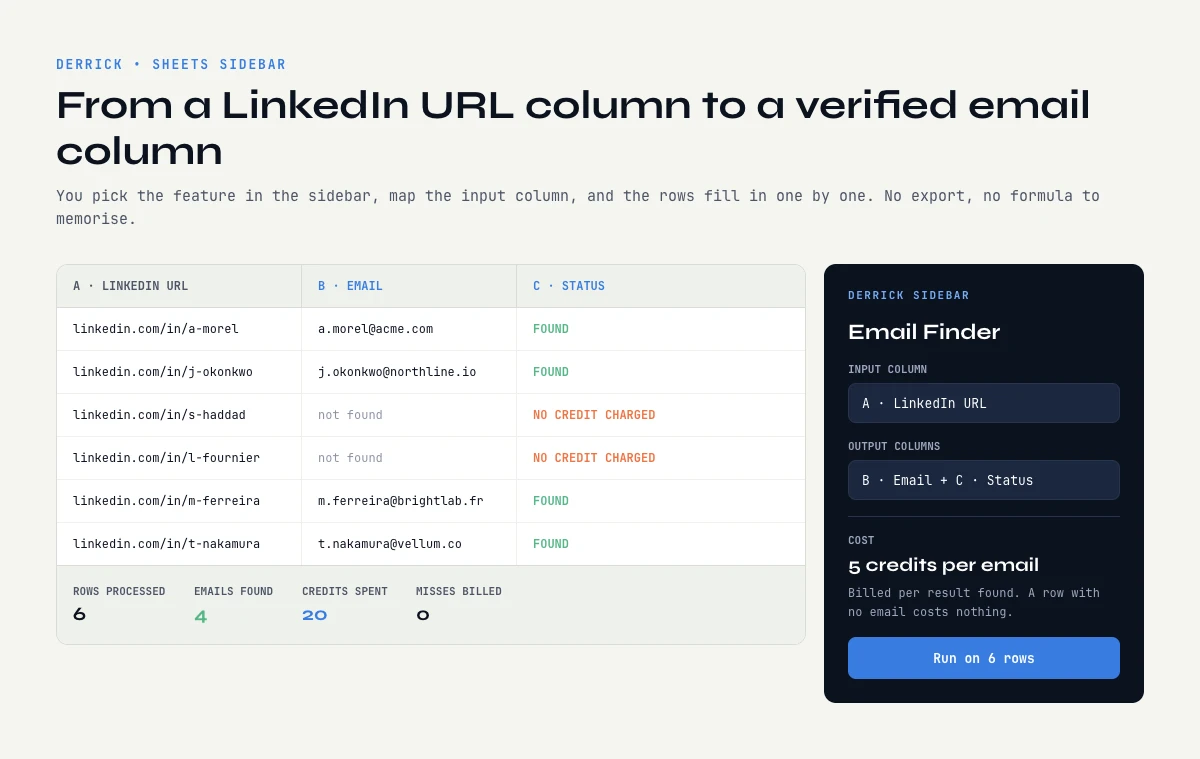
The bet behind Derrick is that the email finder should run where the list lives, in its web app or from a Google Sheets sidebar, instead of a CSV round-trip. The same credit pool works in the web app and in the Google Sheets add-on, and from the PLUS plan (€47.50/month) it also reaches the REST API and the MCP server, for Claude, ChatGPT or any MCP client. The Chrome extension is not a separate finder: it connects your LinkedIn session so the LinkedIn features can read profiles.
Workflow shape. The lookup runs in the Derrick web app, with nothing to install, or from the Google Sheets sidebar; the steps are the same. Paste a column of LinkedIn profile URLs. Run Enrich Leads to read the name and current company of each profile through your connected LinkedIn session. Then run the Email Finder on those rows. The emails fill into the next column, with a progress indicator while the batch runs.
Hit rate on B2B URLs. 75-90% on US/EU profiles at companies above 50 employees, according to Derrick internal tests. That is our own measure, not an independent one, which is why the method chapter below asks you to run your own sample. The verification step runs before the email returns into the Sheet, so the address that lands in the column is the catch-all-filtered one, not a raw guess from a name+domain permutation.
What the same credits unlock beyond a list. A Sales Navigator search comes in through Import LinkedIn Leads (1 credit per profile, through your connected LinkedIn session), then the Email Finder runs on the imported rows. From the PLUS plan, the API runs the email lookup inside a backend pipeline and the MCP server exposes it to an AI assistant. The team can switch between surfaces without buying separate seats.
Bulk: from a list of LinkedIn URLs. Bulk is where a list tool earns its place. You do not paste URLs and get emails in one magic step: Derrick first reads each profile with Enrich Leads, which needs your LinkedIn session connected through the Chrome extension, then finds the address with the Email Finder. Both steps run on the whole column at once, in the web app or in Google Sheets, and the result stays next to the source row, so filtering, deduplicating and pushing to a sequencer happen on the same list. For a list that has no LinkedIn URLs at all, only names and companies, the Email Finder works directly from those columns. The bulk email finder guide covers the volume side in detail.
Pricing. STANDARD at €20/month for 10,000 credits, then PLUS at €47.50/month for 25,000 credits, the plan that adds the API and the MCP server. The free plan gives 100 credits per month with no card, but the Email Finder itself needs a paid plan. The Email Finder costs 5 credits per email and is billed only when an address actually comes back. A 1,000-emails-per-month workload sits inside STANDARD with margin to spare.
Where it fits. SDR teams running prospecting in Sheets, recruiters enriching shortlists, growth ops piping LinkedIn data into a CRM through the API, AI-first teams calling the MCP from Claude or a custom agent.
What to plan for. Large Sales Navigator imports run through your own LinkedIn session, so they follow a pace that keeps that account safe rather than dumping thousands of rows at once. Split a very large export over several sessions.
Account safety: which modes touch your LinkedIn session
The question behind "is this tool safe?" is simple: does it act through your LinkedIn account, or not? The answer depends on the mode, not on the brand.
- Extension running in your session. The LinkedIn email extractor shape: it reads the page you have open, or walks a Sales Navigator search, while you are logged in. Every profile it opens is an action on your account, so volume and pace matter.
- List tool connected to your session. The tool reads profiles server-side, but with your LinkedIn session, connected once through an extension. This is how Derrick works for Enrich Leads and Import LinkedIn Leads. It is still your account doing the reading, so the same care applies.
- No session at all. The tool never touches LinkedIn: it starts from a name and a company, or from its own database. Derrick's Email Finder works this way when your list already has names and companies.
How many profiles per day is safe? Nobody outside LinkedIn knows the exact line, and it changes with the age and activity of the account. What reliably keeps an account out of trouble: a steady daily rhythm close to how a person browses, no sudden jump from zero to thousands, and big imports split over several days. The LinkedIn limits guide goes through what is known and what is guesswork. One more rule: the email lookup itself does not need LinkedIn. Once a profile is read, the address step runs without your session.
Chapter 4: Hunter (email-only specialist)
Hunter is the oldest dedicated email finder on this list. The product centres on three things: domain search (every email Hunter has on a given company domain), email finder (name + domain returns an email), and email verifier (validate addresses already in hand).
LinkedIn workflow. The Hunter Chrome extension overlays a button on a LinkedIn profile that returns the email Hunter has for that contact. No bulk Sales Navigator export inside the extension itself; Hunter's bulk path lives in the dashboard with a CSV upload.
Verification. The verification engine is conservative: fewer addresses come back as found, and the ones that do are meant to be deliverable.
Pricing. Starter at €49/month on monthly billing for 2,000 credits, Growth at €149/month for 10,000 credits, as listed on 13 October 2026. The free tier gives 50 credits per month.
Where it fits. Teams that want the email finder as a standalone tool and do not need the broader sales intelligence layer. Outreach operators who care most about the verifier quality.
The app works through your list row by row: 5 credits per email found, nothing is billed without a result.
Chapter 5: Wiza vs Mailmeteor vs Apollo (Chrome extension category)
Three of the most-searched names sit in the Chrome extension category, the LinkedIn email extractor shape, with different angles on it. The broader landscape of LinkedIn Chrome extensions including these three lives in the Chrome extension comparison.
Wiza. The extension runs on Sales Navigator search results and exports the matched profiles with emails attached. The flagship use case is the 1,000-row Sales Navigator export turned into a clean CSV in one batch. Pricing on monthly billing: $49/month for 100 emails, $99/month for 500 emails (checked 13 October 2026). Wiza Sheets ships a Google Sheets sidebar as an add-on path, which narrows the gap with Derrick on the Sheets workflow.
Mailmeteor. Mailmeteor is primarily a Gmail mail-merge tool, with an email finder feature added in 2024. On 13 October 2026 its pricing page listed the email finder as a free tool, with the paid plans covering mail merge. The angle is the send-from-Gmail loop for operators who want to find and send from the same place.
Apollo. The Apollo Chrome extension surfaces emails on LinkedIn pages and pulls them into the Apollo platform for sequencing. It leans on a large contact database. The Basic plan was listed at $49/month with 3,000 export credits in May 2026; the public page did not display amounts on 13 October 2026. The Apollo for Sheets add-on extends the workflow to the Sheets surface. Apollo's all-in-one positioning matters when the team wants email plus sequences plus CRM in one seat, and becomes a friction when the team only wants the email finder and ends up paying for unused features.
Chapter 6: Snov, GetProspect, RocketReach, ContactOut (mixed category)
Four vendors that sit between the dedicated email finders and the full sales intelligence platforms.
Snov. Email finder, drip campaigns, CRM, all in one. The Chrome extension extracts emails on LinkedIn profiles and search results. Entry at $39/month for 1,000 credits (checked 13 October 2026). The bundled drip campaign feature appeals to small teams who want a single tool from finder to send.
GetProspect. Chrome extension plus API. Built around bulk LinkedIn search exports, lighter on the platform side. Entry at $49/month for 1,000 emails (May 2026 figure). A common pick for ops teams who want the LinkedIn extraction without the CRM bundle.
RocketReach. Larger contact database, weighted toward senior decision-maker emails. Entry at $80/month for 1,500 lookups (May 2026 figure). The pricing tilt makes it most useful for executive search and ABM rather than high-velocity SDR.
ContactOut. Premium-priced Chrome extension that covers personal emails (Gmail, Yahoo) in addition to work emails. Entry at $99/month with an annual-only flavour (May 2026 figure). The personal-email angle is the differentiator for recruiter workflows.
Chapter 7: Findymail, Lusha, AnyMail Finder (specialists)
Three vendors with sharper specialties.
Findymail. Email-only specialist with a Google Sheets add-on, a Chrome extension, and an API. Built for bulk, with a single Starter plan at $99/month for 5,000 finder credits on 13 October 2026. On this list, Derrick pairs the lowest entry price with both a web app and a Sheets workflow.
Lusha. Covers phone numbers in addition to emails, mostly for senior decision makers in North America. Starter at $49.90/month for 400 credits on 13 October 2026, with an email reveal at 1 credit and a phone at 5. The phone-plus-email combination is what the team pays for.
AnyMail Finder. Pure API and bulk file upload, no Chrome extension. Built for backend pipelines rather than in-tab use. From €26/month for 400 credits, €39/month for 1,000 (13 October 2026), plus one-time credit packs that suit ops teams running irregular bulk jobs.
How to compare the best LinkedIn email finders on your own rows
Why no independent accuracy benchmark exists. Every published hit rate in this category is measured by someone on some list, and the list decides the result. Senior people at large US companies come back far more often than founders of young companies in smaller markets, at every vendor. A tool tested on the first kind of list will beat a better tool tested on the second. Vendors do not share a common test set, and nobody pays to run twelve tools on the same thousand rows every quarter. So a single number across tools tells you little. The one comparison that holds is the one you run on your own prospects.
The method takes an afternoon:
- Pick a sample that looks like your real targets. Fifty to two hundred LinkedIn URLs, drawn from the list you will actually work, with the same mix of countries, company sizes and seniority.
- Shortlist two or three tools from the right category. List tool, extension or API, depending on your workflow. Comparing across categories mixes two questions.
- Run the same sample through each, on the same day. Data moves; a week apart is not the same test.
- Count valid emails only. Risky and catch-all results go in a separate column. A tool that returns many uncertain addresses looks good until the bounces arrive.
- Divide the money spent by the valid emails. That cost per valid email, next to the hit rate, is the number that decides.
Selection criteria come after that number: where the tool runs (web app, Sheets, extension, API), whether it bills per search or per result found, how it treats your LinkedIn account, and whether the free tier lets you run the test at all.
Chapter 8: Picking the best LinkedIn email finder by category and cost per email found
Without comparable hit rates, the matrix works on what is known: the category, what drives the cost per email found, and what you must measure on your own rows.
| Category | Fits | What drives the cost per email found | Measure on your rows |
|---|---|---|---|
| List tool (web app, Sheets) | A list of LinkedIn URLs or names to enrich | Billing per result found or per search; credits per profile read | Valid emails on your sample, rows left empty |
| Chrome extension (LinkedIn email extractor) | Sales Navigator searches, one profile at a time | Emails per plan, one-time or monthly free credits | Valid emails per export, pace your account tolerates |
| API | CRM or backend pipeline, no human in the loop | Price per credit at your volume, plan needed for API access | Valid emails per 1,000 calls, error handling |
| Email-only specialist | Teams that only want the address | Search vs found billing, verification included or not | Share of catch-all and risky results |
| Sales intelligence platform | Teams that also use its CRM and sequences | Seat price shared with other features | Cost per valid email once unused features are counted |
Three workloads cover most teams, and the right category depends on which one applies.
Workload 1: 200-1,000 emails per month, ad-hoc, Sheets-first. The list category wins, in a web app or in Sheets. Derrick from €20/month is the entry point on this list, billed per email found. Going from a column of LinkedIn URLs to a column of verified emails without a CSV round-trip is the whole point.
Workload 2: 1,000-5,000 emails per month, mostly from Sales Navigator searches. The import of the search is the differentiator. Extensions such as Wiza, Evaboot, GetProspect or Apollo Chrome work on the search-result panel. Derrick imports the search with Import LinkedIn Leads (1 credit per profile, through your connected session) into the web app or Sheets, then runs the Email Finder on the rows (5 credits per email found), so the list and the emails stay in one place.
Workload 3: 5,000+ emails per month, programmatic, piped into a CRM. The API category wins. Derrick (API and MCP from PLUS, €47.50/month), Hunter, Snov, Findymail, AnyMail Finder, Apollo. The per-email cost compresses fastest at this volume. Commit to the vendor that wins your own sample test, not to a published rate.
The detail on calling these vendors from code lives in the LinkedIn data extraction API guide, which walks through the three vendor categories and the auth patterns. For the Sheets-side workflow including the API plus Apps Script combination, the LinkedIn data to Google Sheets guide compares the five paths end to end.
Chapter 9: Free tiers of the best LinkedIn email finders compared
The free tier is the way to size a vendor without committing to a month. What each one shipped on 13 October 2026, except where a May 2026 figure is marked.
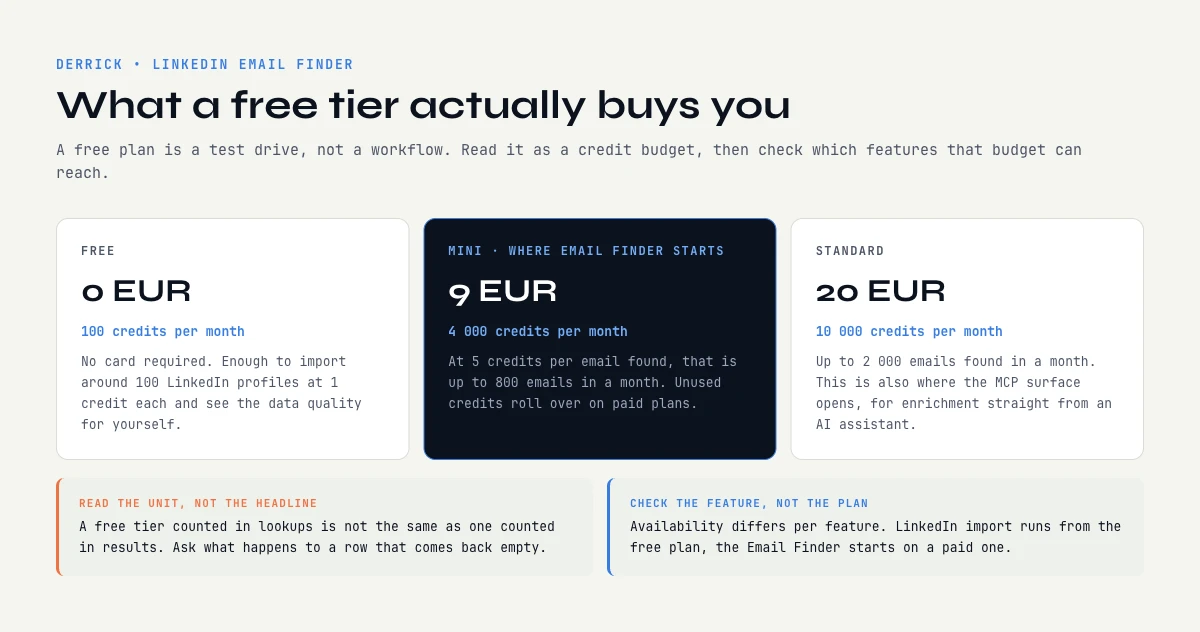
Derrick. 100 credits per month, no credit card, in the web app and in Google Sheets, with the Chrome extension to connect your LinkedIn session. They cover free features such as Enrich Leads (1 credit per profile). The Email Finder, the API and the MCP need a paid plan: the Email Finder from STANDARD (€20/month), the API and the MCP from PLUS (€47.50/month).
Hunter. 50 credits per month, recurring rather than one-time.
Apollo. Free plan with limited credits and full platform access, so the whole platform can be evaluated end to end.
Wiza. 20 emails per month on the free plan. Enough to test a small sample, not a recurring workload.
Mailmeteor finder. Listed as a free tool, with no paid finder plan.
Snov. 50 credits on the free trial plan, renewed monthly, with bulk and exports locked.
GetProspect. 50 emails one-time at signup (May 2026 figure).
Findymail. 10 credits to test before buying.
ContactOut. 40 emails one-time at signup (May 2026 figure).
RocketReach. 5 lookups per month (May 2026 figure).
Lusha. 40 credits per month, recurring.
AnyMail Finder. 100 free credits at signup, with card verification.
The fairest comparison shape: pick three vendors that fit the workload, sign up to each free tier, run the same 30-50 LinkedIn URL sample through all three on the same day, count the verified hits. The winner on that test is the right vendor regardless of the marketing claims.
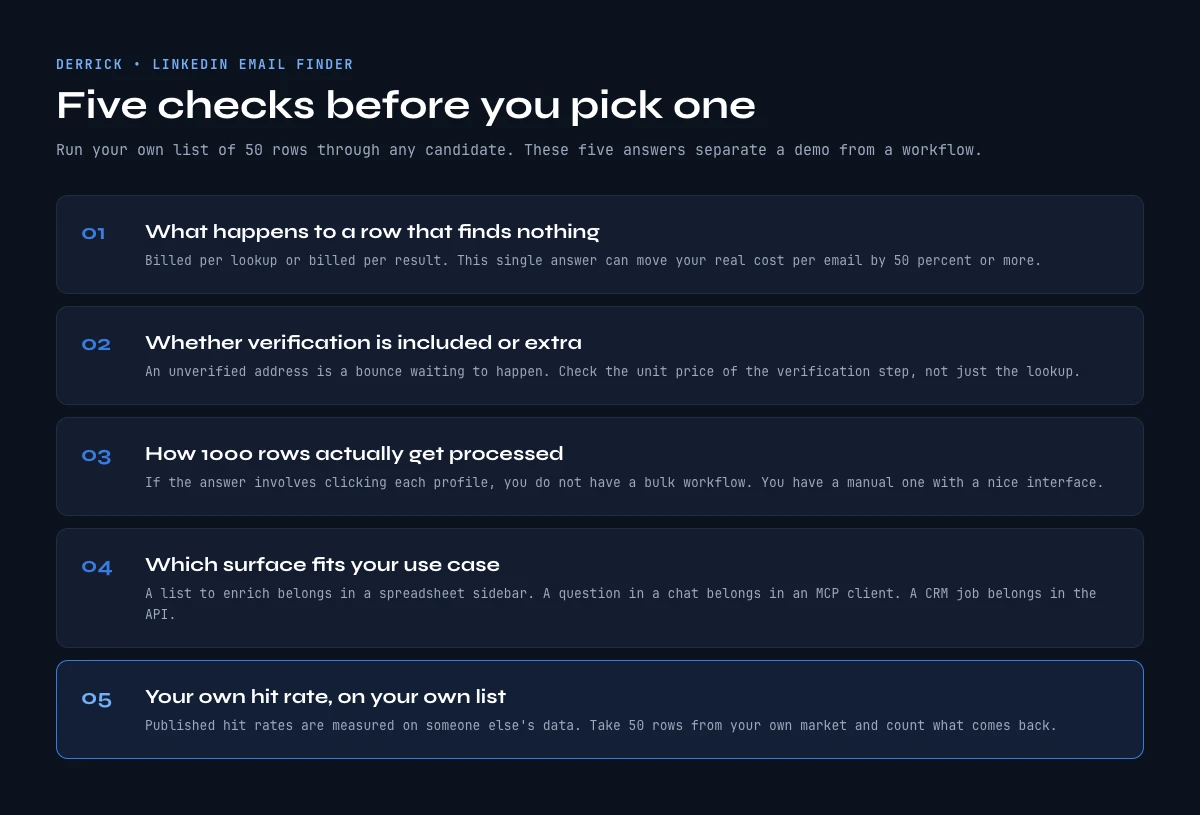
Key takeaways on choosing the best LinkedIn email finder
- Twelve tools ship LinkedIn email finding in 2026 across five categories: list tools (web app or Sheets), Chrome extensions, B2B email finder APIs, dedicated email-only tools, and sales intelligence platforms with email as one feature.
- No independent benchmark measures these tools on the same rows. Derrick internal tests give 75-90% on US/EU profiles at companies above 50 employees; for any other tool, measure on your own sample.
- Derrick starts at €20/month (STANDARD) with the Email Finder billed 5 credits per email found; compare every vendor on cost per valid email, not on sticker price.
- The list category (web app or Sheets) wins for SDRs and recruiters who work from a list, because the workflow has no CSV round-trip.
- Sales Navigator searches go through your LinkedIn session whatever the tool; pace large imports to protect the account.
- The API category wins for 5,000+ emails per month piped into a CRM through code.
- The honest comparison method is to run the same sample of your own URLs through two or three tools on the same day and count valid emails only.
Frequently asked questions
What is the best LinkedIn email finder in 2026?
What hit rate should I expect from a LinkedIn email finder?
How much does a LinkedIn email finder cost?
How do I compare two email finder tools fairly?
Which email finder is best for Sales Navigator exports?
What is the difference between a LinkedIn email extractor and an email finder?
What about private or incomplete profiles?
Keep reading
Continue exploring this cluster


Best LinkedIn Scrapers 2026: 10 Tools Compared (Pricing, Limits & Workflows)
Read →

Best LinkedIn Scraper Chrome Extensions 2026: 12 Tools Compared (Workflow, Risk, Pricing)
Read →

LinkedIn Scraper MCP: How to Pull LinkedIn Data Straight Into Claude (2026 Guide)
Read →

How to Extract Company Info from LinkedIn Profile URL: Complete 2026 Guide
Read →